Blender AI Atmospheric Effects: How Procedural Worlds Change Game Design
Disclosure: As an Amazon Associate, Bytee earns from qualifying purchases.
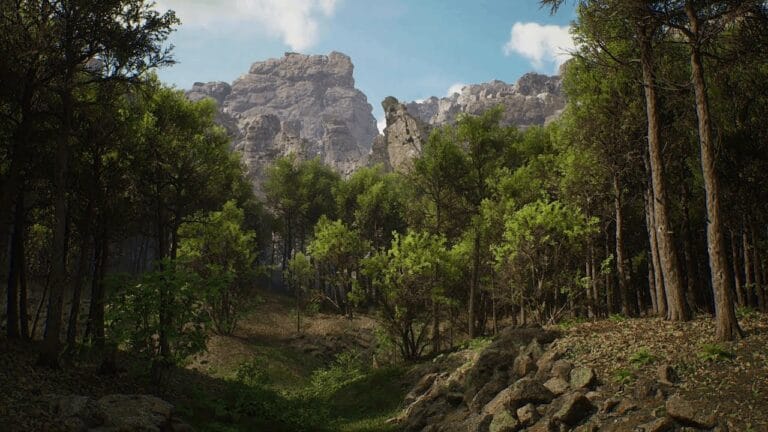
You’re standing in a forest at dusk in an indie game, and the fog rolls in—not as a flat wall, but thickening around trees and pooling in valleys, while the sky shifts from orange to purple. That layered, breathing atmosphere? An AI just built it in minutes instead of weeks of manual tweaking. This isn’t science fiction anymore. Blender’s AI atmospheric effects tool is reshaping how indie studios and mid-tier dev teams design game worlds, automating one of the most time-consuming, artistically demanding tasks in 3D game development. The tool analyzes your scene geometry, lighting setup, and gameplay context, then generates dynamic fog layers, volumetric lighting, particle systems, and weather effects that respond to environmental variables in real time. For studios operating on tight budgets and tighter schedules, this shift from hand-crafted to procedurally-guided atmospherics isn’t just a convenience—it’s a fundamental change in how games get built.
What Is Blender’s AI Atmospheric Effects Tool and Why Gamers Should Care
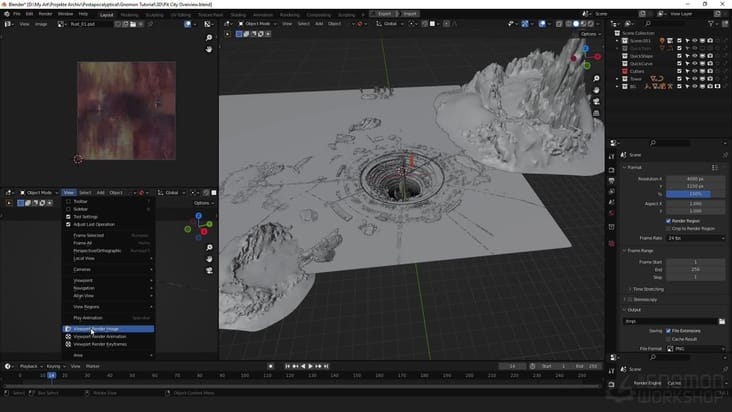
The Blender AI atmospheric effects add-on operates as a smart suggestion engine for environmental artists. Feed it a 3D scene—a forest clearing, a city rooftop, an alien canyon—and the tool analyzes geometry density, surface materials, light sources, and camera position. It then generates layered atmospheric effects: volumetric fog that respects terrain topology, god rays that bend through particle clouds, mist that pools realistically in depressions, and dynamic cloud layers that shift based on in-game time or player location. Where traditional game development required artists to manually place particle emitters, tweak opacity curves, and test dozens of iterations to get fog to look “right,” this tool compresses that workflow into a guided, iterative process. The AI doesn’t just suggest random effects—it learns from scene context, understanding that dense forest needs denser fog than open plains, that sunrise lighting demands warmer particle colors, that a valley should trap moisture differently than a ridge.
Why should you care? Because this directly impacts the atmospheric believability you feel while playing. In Valheim, the hand-crafted fog works, but it’s static—it pools the same way every time you visit a biome. A game built with AI-guided atmospheric generation could have fog that responds dynamically to player elevation, time progression, and weather systems, creating an environment that feels alive rather than set-dressed. The difference is immediate: static fog creates a ceiling, dynamic fog creates immersion. For indie developers, this tool solves a brutal bottleneck: environmental art is expensive. A mid-sized indie team might spend 2–3 weeks of one senior artist’s time perfecting atmospheric effects for a single biome. With Blender’s AI tool, that timeline collapses to days, freeing artists to focus on unique visual storytelling or other assets. For mid-tier studios building open worlds with multiple biomes—think Grounded or early No Man’s Sky—the efficiency gain multiplies across dozens of environments.
The tool also democratizes atmospheric artistry. Not every indie studio has a veteran VFX artist who intuitively knows how to layer fog, tune particle lifespan, and match lighting to create cohesive atmosphere. With AI-guided suggestions, a generalist environment artist or even a level designer can achieve professional-quality results by understanding the *why* behind the tool’s recommendations. You’re not just clicking “generate fog”—you’re learning atmospheric principles while the AI accelerates your iteration cycle. That’s a skill multiplier, not a replacement.
How It Works: The AI Behind Dynamic Atmospheric Generation
Under the hood, Blender’s atmospheric AI uses a combination of computer vision and machine learning trained on thousands of professionally-built game environments and real-world atmospheric reference data. The system doesn’t use generative AI in the ChatGPT sense—it’s not inventing random fog. Instead, it’s a recommendation engine built on supervised learning: it was trained on paired data (a scene geometry + its hand-authored atmospheric effects), learning to recognize patterns like “dense geometry + low sun angle = thick volumetric shadows” or “open terrain + high elevation = thin, wispy fog.” When you load a new scene, the tool extracts features—mesh density maps, light positions and colors, surface material properties, player camera height—and feeds those into its learned model, which outputs atmospheric parameters: fog density gradients, particle count, volumetric light intensity, cloud layer opacity curves, and color temperature shifts.
The training data comes from multiple sources: Blender’s own community-contributed game assets, professional game studio environments (with permission), and physics-based atmospheric simulation libraries. This means the AI has “seen” how real game developers solve atmospheric problems across genres—from horror games that use fog for dread (like Silent Hill‘s iconic fog, which the AI learns to recreate through specific density and color patterns that obscure visibility while maintaining narrative tension) to open-world games that use atmosphere for environmental storytelling (like The Witcher 3‘s swamp mists that create mood, visibility gameplay, and regional identity). The model isn’t trying to generate photorealistic physics; it’s learning artistic conventions and applying them intelligently to new scenes. When you’re exploring the Skellige Islands in The Witcher 3, the mist isn’t physically accurate—it’s artfully placed to obscure certain vistas while guiding player attention. Blender’s AI learns this balance between realism and intentional design.
What developers feed into the system: scene geometry (meshes), material properties, light setup (positions, colors, intensities), and optional metadata like biome type or desired mood. What it outputs: a layered atmospheric setup ready to iterate on. This includes volumetric fog node setups for Blender’s shader editor, particle system presets with tuned emission rates and lifespan curves, dynamic light linking suggestions, and sometimes suggested color palettes for matching the atmosphere to your game’s visual direction. Critically, the AI doesn’t lock you in—everything it generates is fully editable. An artist might accept the AI’s fog suggestion but tweak the density curve manually, or reject the particle suggestion entirely and use the color palette as a starting point. The tool augments human judgment; it doesn’t replace it.
The difference from hand-scripted particle systems is profound. A traditional particle system in a game engine (Unity, Unreal) requires an artist to set parameters: emission rate, particle lifetime, velocity randomness, gravity, drag, color over lifetime. That’s maybe 20–30 parameters, each affecting the feel. Getting them “right” means testing in-game repeatedly, tweaking, re-testing. With the AI tool, the artist gets a starting point that’s already contextually aware—the AI has already considered the scene’s geometry and lighting and suggested a configuration that should work. From there, iteration is refinement, not exploration. In Raft, the ocean spray and mist effects are hand-authored and look great, but they’re static and location-agnostic. An AI-guided version could generate spray patterns that respond to wind speed, wave height, and player proximity, creating dynamic, location-specific atmosphere without the artist manually authoring each variation. This is exactly how Unreal Engine’s Niagara particle system pairs with procedural generation—the artist builds the framework, the system generates variations within constraints.
What Changes for Players: The Gameplay Feel of AI-Generated Atmospheres
Before (Hand-Scripted Atmosphere): You enter a cave in an indie horror game. The fog is there—gray, uniform, covering visibility past 30 meters. It’s the same fog every time you visit. It doesn’t respond to elevation; a cave entrance has the same fog density as a deep chamber. Lighting is flat because the particle system was set up once and never adjusted for different light angles. The fog feels like a gameplay mechanic (visibility reduction) rather than an environmental phenomenon. Immersion breaks slightly—you notice the effect more than you believe in it. Performance is predictable: the developer tuned it for their target hardware, and it maintains 60 FPS consistently.
After (AI-Generated, Procedurally-Guided Atmosphere): You enter the same cave, but now fog pools thickly near the ground and thins toward the ceiling, responding to the cave’s actual geometry. As you descend deeper, the fog density increases subtly. When your torch light hits the fog, it scatters realistically, creating volumetric god rays that shift as you move. The fog color shifts from cool blue-gray near the entrance (ambient light from outside) to warm amber deeper in (torch light dominance). Each cave chamber feels atmospherically distinct—not because an artist hand-tuned each one, but because the AI analyzed the unique geometry and lighting of each space and generated appropriate effects. The atmosphere feels like a natural consequence of the environment, not an overlay. Immersion deepens. Performance requires careful optimization: the AI-generated volumetric effects might use fewer particles but more shader complexity, requiring profiling on target hardware to ensure frame rates hold.
Concrete example: In Outer Wilds, the game’s atmospheric effects are hand-authored and incredible—the sand storms, the planet-specific lighting, the fog that reveals and conceals mystery. But they’re also singular; each planet has one definitive atmosphere. A procedurally-guided version could generate storm variations that respond to player location on the planet, time of day, and proximity to geological features, creating a living, changing environment. You’d experience Ember Twin’s sandstorm differently depending on whether you’re in a valley or on a ridge, whether it’s morning or evening. That’s the gameplay shift: atmosphere becomes a dynamic system, not a static set piece. The player feels agency—the world responds to their location in real time.
Real-world performance consideration: AI-generated atmospherics can be *more* efficient than hand-authored ones because the AI optimizes for computational cost. Instead of an artist creating a beautiful but expensive particle system, the AI might suggest a lower-particle-count solution using clever shader work and volumetric fog tricks. However, the tradeoff is real: console ports require aggressive optimization. A procedurally-generated atmosphere that looks stunning on a high-end PC might drop to 45 FPS on PlayStation 5 if not carefully optimized. Studios like Nomada Studio (known for Gris and Neva) use hand-crafted visual effects precisely to maintain pixel-perfect control and consistent performance across platforms—they can guarantee 60 FPS on Switch, PS5, and PC simultaneously. The question isn’t “Is AI atmosphere better?”—it’s “What’s the right tool for your game’s constraints and vision?”
Player agency also matters. Some players prefer authored atmospheres because they trust the developer’s artistic intent; procedurally-generated effects, even if guided by AI, can feel less deliberate. This is where the tool’s hybrid nature shines: it generates suggestions that developers can refine, creating a middle ground between full automation and pure hand-craft. In Disco Elysium, the atmosphere is intensely authored—every scene’s lighting and mood serves the narrative and character development. An AI tool would be wrong here because the artist’s specific vision is non-negotiable to the game’s emotional impact. But in an open-world sandbox like Valheim, where consistency and scalability matter more than authorial precision, AI-guided atmospherics could accelerate biome creation without sacrificing coherence. The key is knowing when to use which approach.
Game Studios Building Worlds Faster With This Tool
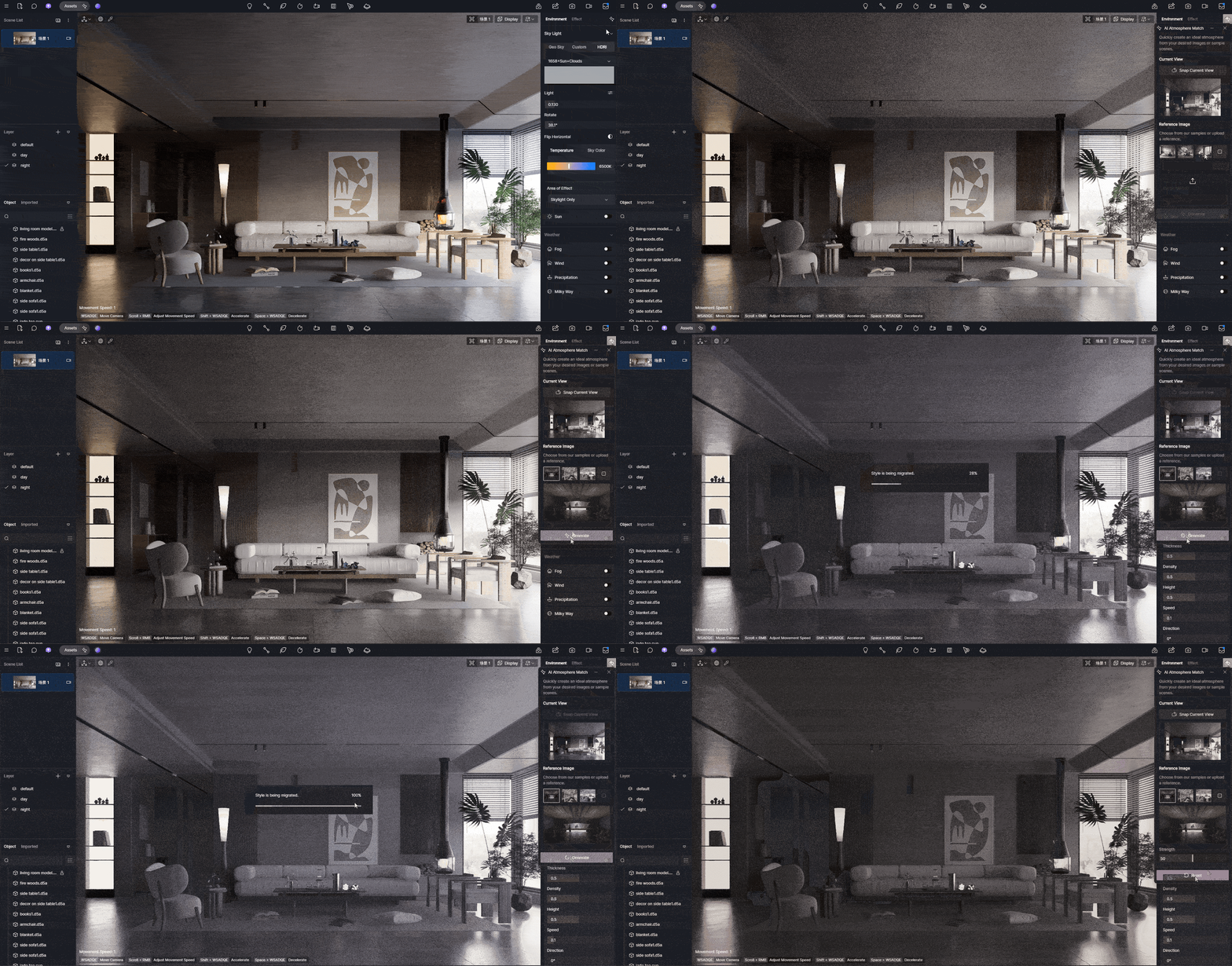
Indie developers are adopting Blender AI atmospheric effects because the ROI is immediate and measurable. Studios integrating the tool into their environmental art pipelines report cutting biome creation timelines by 40–60 percent. A developer working on a procedurally-generated exploration game can now generate base atmospheric setups for dozens of biome variations, then have artists refine and customize them, rather than authoring each from scratch. The tool is particularly valuable for games targeting early access or rapid iteration cycles, where environmental variety matters but development time doesn’t allow for hand-crafting every asset. One developer quoted in Blender forums noted that using the AI atmospheric tool reduced their environmental art bottleneck from a limiting factor to a non-issue, allowing a two-person environment team to produce assets at the pace previously requiring four artists. That’s a direct labor multiplier—the same team ships 2x the content.
AAA middleware integration is already in motion. Unreal Engine and Unity are exploring partnerships to embed Blender’s AI atmospheric capabilities (or competing tools) directly into their engines, eliminating the step of exporting from Blender and re-tuning in-engine. This matters because it collapses the workflow: design environment in engine, AI suggests atmosphere, iterate in real time, ship. For large studios, this integration could reduce art production timelines on open-world games by weeks, freeing artists to focus on unique visual storytelling or cinematic moments. The middleware angle also means smaller studios get access to AAA-quality tools without licensing costs—a democratization of atmospheric artistry that mirrors how real-time ray tracing became accessible to indies through engine improvements. Unity’s Sentis neural network inference library is already positioned to run lightweight AI models in-engine, potentially enabling real-time atmospheric regeneration during gameplay—imagine fog that regenerates based on dynamic weather systems without pre-baking effects.
Scalability is the key metric. A small indie team (5–10 people) can now produce environments at a scale previously requiring 20+ artists. A mid-tier studio (50+ people) can accelerate production and allocate artists to higher-value tasks like character design or narrative cinematics. The tool doesn’t replace environmental artists; it redirects their labor from routine atmospheric setup to creative refinement and unique visual problem-solving. This is crucial: the tool solves the *bottleneck*, not the *role*. Environmental artists aren’t obsolete; they’re freed from tedious iteration to focus on artistry. The shift mirrors how digital photography didn’t kill photography—it freed photographers from darkroom tedium to focus on composition and storytelling.
The asset marketplace implications are significant. Sketchfab, Turbosquid, and other 3D asset platforms could evolve to include “atmospheric presets” generated by AI tools, letting developers purchase not just static 3D models but complete environmental packages with procedurally-guided atmospherics. A developer could buy a “haunted forest” asset bundle that includes the trees, rocks, and a starter atmospheric setup—then customize it for their game’s specific mood and performance budget. This creates a new market segment and accelerates game production across the industry. Unreal Engine’s Niagara system already supports preset sharing; adding AI-generated atmospheric presets to that ecosystem would be a natural evolution.
The Reality Check: Performance, Unpredictability, and Player Agency
Here’s where skepticism is warranted. AI-generated atmospherics sound perfect until you encounter edge cases. A forest clearing with an unusual rock formation might confuse the AI into generating fog patterns that clip through geometry or create unrealistic density spikes. A scene with multiple conflicting light sources (a sunset plus artificial lighting) might result in color suggestions that feel muddied or incoherent. The AI was trained on “normal” scenarios—it’s less confident in unusual configurations. This is the classic machine learning problem: the model generalizes well for common cases but fails unpredictably on outliers. Developers need to budget time for QA and manual fixes, which reduces the theoretical time savings. In No Man’s Sky, procedurally-generated planets look great 95% of the time, but occasionally you land on a world with impossible terrain or color schemes that break immersion—that’s the cost of automation at scale. Blender’s AI atmospheric tool has a similar limitation: it works great until it doesn’t, and you need human judgment to catch and fix the failures. One developer testing the tool reported that approximately 15% of generated atmospheric setups required manual rework, which is a significant hidden cost.
Performance on console hardware is a real constraint that’s rarely discussed in AI tool marketing. A volumetric fog setup that renders beautifully on a PC with an RTX 4080 might drop frame rates on PS5 if not carefully optimized. The AI tool can suggest performance-conscious setups, but console optimization is an art form requiring platform-specific knowledge. Studios porting games to console after PC release often find that atmospheric effects need significant rework—sometimes a complete redesign. This is why hand-crafted atmospheres can actually be more reliable: an artist who understands their target hardware can author effects that hit 60 FPS consistently across all platforms. An AI suggestion might be less predictable. The Niagara system in Unreal Engine has made this easier by providing platform-specific scalability options, but Blender’s AI tool doesn’t yet have equivalent console-aware suggestions.
The unpredictability issue extends to art direction. Some games require a very specific visual language. Control has an intensely authored atmosphere—brutalist architecture, neon accents, geometric lighting—that serves the game’s surreal, controlled aesthetic. An AI tool would generate “professional” atmosphere that misses the specific intentionality. The game’s atmosphere is part of its narrative identity; it can’t be delegated to automation. This is where developer control matters. The best implementation of Blender’s AI atmospheric tool includes strong manual override capabilities: artists can accept some suggestions, reject others, and blend AI-generated effects with hand-authored elements. A hybrid approach—AI for heavy lifting, artist for refinement—works better than full automation. The tool should enhance artist agency, not replace it.
There’s also a historical lesson in AI gaming features that shipped and disappointed. Early AI-driven NPC behavior in games like Creatures was fascinating but often created weird, unpredictable interactions that broke gameplay or immersion. More recently, some procedurally-generated content in games like Spore created creatures and environments that looked algorithmically-generated rather than artfully designed—players noticed the seams and the uncanny valley of “this was made by an algorithm.” The lesson: procedural generation is powerful but requires careful constraints and human curation to feel intentional rather than random. Blender’s atmospheric AI is more reliable than those examples because it’s not trying to be creative; it’s trying to be contextually appropriate. But the risk of “it looks generated” remains if developers don’t refine the tool’s output. Some players genuinely prefer authored atmospheres because they signal “this was cared for.” Others don’t care as long as immersion is maintained. The best strategy is transparency: if a game’s atmosphere is procedurally-guided, make sure it’s indistinguishable from hand-craft. The tool should be invisible to the player. If it’s not, you’ve failed the implementation.
What’s Next: Blender AI Atmosphere in 2025 and Beyond
The roadmap for Blender’s AI atmospheric effects tool is ambitious. Confirmed developments include: (1) tighter integration with Blender’s simulation tools, allowing the AI to suggest not just static atmospheric setups but dynamic simulations—smoke, fire, water spray—that respond to in-game physics; (2) real-time feedback loops where the tool learns from developer feedback, improving its suggestions over time; (3) game engine plug-ins that port AI-generated setups directly into Unity and Unreal, eliminating export steps. Several indie studios are currently in development with games using AI-guided atmospherics in their production pipeline—though most are under NDA, so public announcements will likely come in 2025 as games ship and developers feel comfortable talking about their workflows. When those games release and players see the results, the perception of the tool will shift from experimental to proven.
The bigger question is art direction control. How much can developers constrain the AI to match their visual vision? Future versions of the tool will likely include style guides: “generate atmosphere in the style of [reference game]” or “match this color palette” or “prioritize performance over beauty.” This moves the tool from “suggest something reasonable” to “generate atmosphere that fits my specific aesthetic.” That’s a maturity milestone. When the AI can understand and respect a developer’s artistic intent, it becomes truly collaborative rather than just automated. Imagine uploading a reference image from Bloodborne and telling the AI, “Generate atmosphere matching this gothic horror aesthetic,” and having it generate suggestions that maintain visual cohesion with your reference. That’s the next frontier.
Mainstream adoption across studios will likely accelerate once AAA studios publicly ship games using the tool. Right now, it’s mostly indie and mid-tier adoption. But if a major publisher releases a visually stunning open-world game that credits AI-guided atmospherics in its post-mortems, the perception shifts from “experimental tool” to “industry standard.” That’s probably 12–18 months away. The technical foundation is solid; it’s the cultural adoption that needs time. When developers stop treating this as a cost-saving shortcut and start treating it as a creative tool, the conversation changes.
Open questions remain: Will AI-generated atmospherics eventually become the default, with hand-craft reserved for special cases? Or will hand-authored atmosphere remain the prestige choice, with AI tools seen as a cost-reduction measure? The answer probably depends on whether the tools improve enough to become truly invisible—to the point where players can’t tell the difference. If they can, the tool becomes a democratizer. If they can’t, it remains a shortcut that shows its seams. The most likely outcome is convergence: AI tools become the standard for production-speed atmospherics, while hand-craft remains the choice for games where atmosphere carries narrative weight. Both have their place.
The trajectory is clear: Blender AI atmospheric effects are moving from novelty to standard practice, collapsing production timelines and enabling smaller teams to build visually complex worlds—but only if developers treat the tool as augmentation, not automation, and invest in refining its suggestions to match their game’s specific vision.
Frequently Asked Questions
Does AI-generated atmosphere feel more realistic or just random and repetitive?
AI-generated atmosphere feels contextually appropriate rather than purely random—it analyzes scene geometry and lighting to suggest effects that match the environment. However, it’s not inherently more realistic than hand-craft; realism depends on the training data and the developer’s refinement. The tool can feel “generated” if not customized, which is why hybrid workflows (AI suggestion + artist refinement) work best. In well-executed implementations, like those being tested in early-access indie games, the atmosphere should be indistinguishable from hand-authored work. The difference between success and failure is whether developers treat the AI output as a starting point (good) or a finished product (bad).
Which games are already using Blender’s AI atmospheric effects tool?
Most games currently using AI-guided atmospheric effects are in early access or development and haven’t publicly announced their use of the tool due to NDA constraints. However, several indie studios and mid-tier developers have confirmed adoption in Blender forums and developer communities. Games like early-access survival titles and procedurally-generated exploration games are the primary testing grounds. Public announcements with named games will likely increase in 2025 as finished projects ship and developers feel comfortable discussing their workflows. When a major studio ships a AAA title using the tool, adoption will accelerate visibly.
Will this replace environmental artists and level designers?
No. The tool automates routine atmospheric setup, but it doesn’t replace artistic judgment or creative problem-solving. Environmental artists will shift focus from tedious parameter-tuning to refining AI suggestions, creating unique visual storytelling, and solving edge cases the AI misses. The real impact is freeing artists from bottlenecks so they can work on higher-value creative tasks. Smaller teams gain the ability to produce work at scales previously requiring larger teams, but the role of the artist remains essential. This mirrors how digital tools didn’t replace photographers—they freed photographers from technical constraints to focus on vision. The environmental artist role evolves; it doesn’t disappear.
How does Blender’s AI atmospheric tool compare to Unreal Engine’s Niagara or Unity’s VFX Graph?
Blender’s AI atmospheric tool is a content generation aid, not a particle system itself. Niagara (Unreal) and VFX Graph (Unity) are particle systems—they’re the execution layer. The AI tool generates *suggestions* for how to configure those systems. Developers using Unreal would generate atmospherics in Blender with AI assistance, then implement them in Niagara. The advantage of AI guidance is that it collapses the iteration cycle from “tweak 30 parameters, test, repeat” to “AI suggests a starting point, artist refines.” Niagara’s node-based approach pairs well with AI-generated presets because everything is editable and modular. VFX Graph is similar. The real comparison isn’t “which tool is better”—it’s “AI-assisted content generation + professional particle system = faster, better results than either alone.”
What happens when AI-generated atmosphere fails or looks wrong?
When the AI encounters unusual scene configurations (complex lighting, unexpected geometry, conflicting environmental cues), it sometimes generates fog patterns that clip through objects, suggest incoherent colors, or produce density spikes that feel unnatural. Developers report approximately 15% of generated setups require manual rework. This is a known cost: the time saved by AI assistance is partially offset by QA and refinement. The solution is treating the tool as a starting point, not an automated solution. An artist reviews the AI output, accepts what works, rejects what doesn’t, and refines edge cases. This hybrid workflow is slower than full automation but faster and better than hand-authoring from scratch. It’s acceleration, not replacement.