GOLF+ Omni La Costa VR DLC Review: Worth It? (2026)
Disclosure: As an Amazon Associate, Bytee earns from qualifying purchases.
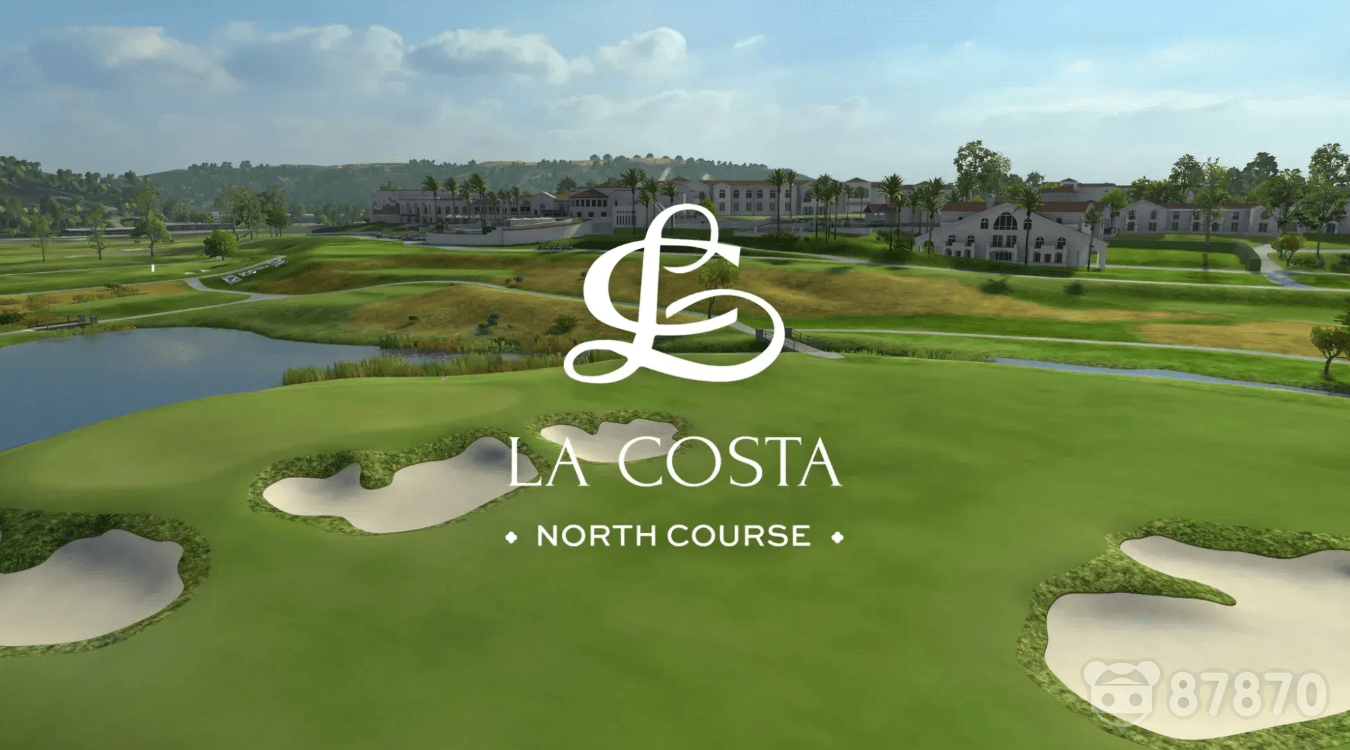
You’re standing on the 18th tee at La Costa, the Pacific breeze in your ears, a 450-yard par-4 stretching out ahead of you in a scale no TV broadcast has ever captured — and your actual arm just drew back a real swing before you even thought about it. The fairway unfolds in true 1:1 scale. Your shadow falls across the tee box. The club head catches the afternoon light exactly as it would on a real range. This is what GOLF+ Omni La Costa delivers: the full sensory grammar of golf translated into virtual space, where your body’s muscle memory becomes the controller.
Platform(s): Meta Quest 2 / Meta Quest 3 / Meta Quest 3S / Meta Quest Pro / PC VR (SteamVR)
Genre: VR Sports Simulation / Golf
Developer: ProSim Golf
Price: $9.99 USD (DLC; requires base GOLF+ app at $9.99 one-time purchase)
Play Area: Standing recommended / Seated possible (min 2×2 m for full swing range)
Game Length: 45–90 minutes per full 18-hole round; endless replayability
Motion Sickness Risk: Low
What Is GOLF+ Omni La Costa, and Which Headsets Can Play It?
GOLF+ Omni La Costa is a DLC expansion for the GOLF+ app, ProSim Golf’s VR-native golf simulation that launched in 2021. Unlike flat-screen ports that bolt on VR support as an afterthought, GOLF+ was built from the ground up for motion controllers and spatial presence. La Costa is the second major course addition to the platform (following Pebble Beach), and it brings the legendary La Costa Resort and Spa — a PGA Tour venue in Carlsbad, California — into full virtual recreation. The DLC requires ownership of the base GOLF+ app (a $9.99 one-time purchase on Quest and PC) and adds La Costa for an additional $9.99, making the total entry point under $20 for a complete golf experience.
Platform support is broad but not universal. The La Costa DLC runs natively on Meta Quest 2, Quest 3, Quest 3S, and Quest Pro, with full cross-save compatibility — start a round on your Quest 3 and resume on PC if you want. PC VR players access it through Steam via SteamVR with any compatible headset (Valve Index, HTC Vive, etc.). However, PSVR2 is not supported as of early 2026, and there are no confirmed plans for PlayStation platform expansion. Each hole at La Costa takes 3–7 minutes to play depending on your skill and pace, meaning a full 18-hole round clocks in at 45–90 minutes of actual play. ProSim licensed the real course layout, elevation data, and aesthetic details from La Costa Resort, which hosted the PGA Tour’s Farmers Insurance Open from 2015 to 2022, lending this DLC genuine prestige beyond digital abstraction.
The VR Experience: Standing on La Costa’s Fairways in Full Presence
Here’s what flat-screen golf sims cannot replicate: the moment your brain accepts that the fairway ahead is real space you can move through. In GOLF+ on a Quest 3, that acceptance happens fast. La Costa’s design capitalizes on VR’s spatial grammar — the course stretches away from you at true scale, palm trees line the fairways at human-sized proportions, and the ocean breeze (rendered through spatial audio design) creates atmospheric depth that a monitor’s stereo speakers cannot touch. When you address the ball at the 18th tee, you’re not looking at a representation of the hole; you’re standing in a photogrammetry-informed space where your actual arm’s swing path matters. The course features dynamic lighting that shifts with time-of-day progression, casting long shadows across fairways during morning rounds and warming everything to gold at sunset. Bunkers don’t just look like sand hazards — they’re volumetric spaces your brain reads as genuine obstacles because your body perceives them from inside the scene.
The standout immersive moment arrives on that 18th hole, where the course panorama opens up and you can see the full layout before you swing. Your peripheral vision catches the clubhouse, the distant practice range, and the California landscape beyond the course boundary. This is presence — not because of graphics alone, but because VR’s spatial rendering lets you stand inside the scene and understand its depth the way your body understands real space. Compared to fictional courses in other VR golf games, La Costa’s real-world provenance adds psychological weight; you’re not just playing a game on a virtual course, you’re standing on a place that exists, that PGA Tour pros have walked, that has hosted major tournaments. That context, combined with accurate elevation changes and the authentic fairway routing, makes La Costa feel less like a content drop and more like a pilgrimage.
Gameplay Deep Dive: Swing Mechanics, Comfort, and How Long You’ll Actually Play
GOLF+ uses motion controller swing detection that reads your wrist angle, swing speed, and follow-through to calculate shot trajectory and distance. On Meta Quest 3’s Touch Plus controllers, this works with reliable accuracy — your backswing and downswing are tracked in real time, and the game responds to genuine swing flaws (slicing, hooking, mis-hits on the club face) rather than abstracting golf into button presses. PC VR with Index controllers or higher-end wands adds even more granular wrist tracking, though the difference is subtle in practice. The putting system on La Costa’s undulating greens requires precision: you read the break, line up your putter, and execute a smooth, controlled stroke. It’s not arcade-simple, and it rewards genuine golf knowledge — understanding green speed, aiming for the apex of a break, and committing to your read.
Comfort is a major strength. Because you stand in place for each swing (locomotion between holes uses a teleport system that poses zero motion sickness risk), there’s no conflicting vestibular input — your inner ear isn’t being fooled while your eyes see movement. Seated play is technically possible, but standing is strongly recommended; your swing accuracy improves dramatically when your whole body can rotate and transfer weight naturally. Sessions break naturally into 1–3 hole casual rounds or full 18-hole campaigns. A casual three-hole round takes about 15–20 minutes; a full 18 requires 45–90 minutes depending on pace and skill. Multiplayer social rounds let you play alongside friends in real time, which extends engagement beyond solo grinding. For VR golf newcomers, La Costa’s difficulty curve is forgiving — the game offers swing aids and feedback, but veterans can disable assists and engage with authentic PGA Tour-level challenge.

Headset Breakdown: Quest 3 vs PC VR — Which Version of La Costa Looks and Plays Best?
The Meta Quest 3 standalone version delivers solid visual fidelity that satisfies most players. La Costa’s fairways render in sharp detail thanks to Quest 3’s improved pancake lens clarity, which sharpens course signage and distant tree lines compared to Quest 2. You’ll notice minor texture pop-in on tree foliage at the course periphery, and shadows on the fairway grass are softer than on PC, but these are not immersion-breaking. Performance holds steady at 72–90 fps, ensuring smooth swing tracking and responsive putting. The no-tether experience is a massive convenience advantage — you swing freely without cable management anxiety, and the social multiplayer experience feels less encumbered on Quest standalone.
PC VR via Steam Link or wired connection elevates La Costa into visual showcase territory. Higher-resolution textures on fairway grass, improved shadow rendering that makes elevation changes read more dramatically, and superior anti-aliasing on course signage all combine to create a sharper, more photorealistic presentation. If you’re playing on a high-end gaming PC with a Valve Index or HTC Vive Pro Eye, La Costa becomes genuinely beautiful — the kind of visual fidelity that makes non-VR golfers stop and stare. Meta Quest 2 is still supported, but ProSim has reduced foliage density and softened shadows to maintain performance; it’s playable but noticeably less detailed than Quest 3.
| Headset | Visual Quality | Price | Exclusive Features | Verdict |
|---|---|---|---|---|
| Meta Quest 3 | High (pancake lens clarity) | $19.98 total ($9.99 app + $9.99 DLC) | Standalone play, no PC required | Best for convenience and social play |
| Meta Quest 2 | Good (reduced foliage, softer shadows) | $19.98 total | Backward compatible | Playable but visually dated |
| PC VR (SteamVR) | Very High (max textures, advanced shadows) | $19.98 total (free via Steam if app owned) | Photorealistic rendering, wired stability | Best for visual showcase and competitive play |
| PSVR2 | N/A | Not supported | None | Not available as of 2026 |
The definitive pick: PC VR for visual showcase and competitive play; Meta Quest 3 for convenience and social rounds. There are no exclusive platform features beyond visual tier differences — all supported headsets play the same course, multiplayer across platforms, and feature set. If you own a capable gaming PC, the PC version is worth the setup hassle for the visual jump. If you’re Quest-only, the Quest 3 version is excellent and requires no additional hardware.
Verdict: Is the GOLF+ Omni La Costa DLC Worth Adding to Your VR Library?
GOLF+ Omni La Costa earns a 8.2 / 10 for what it does exceptionally well: deliver a real golf course into virtual space with authentic swing mechanics and genuine presence. It’s not revolutionary — the core GOLF+ gameplay loop remains unchanged, and the DLC is essentially a new course asset rather than a gameplay overhaul. But for players already invested in GOLF+ or considering entry into VR golf, La Costa justifies its $9.99 price tag through replay value and prestige. The course variety, multiplayer rounds, and daily challenges extend engagement well past a single month of casual play. A regular golfer or VR golf enthusiast will extract 20–50+ hours from La Costa alone.
The price-to-hours ratio is strong for committed players, weak for casual one-time players. If you’ve logged 10+ hours in the base GOLF+ app, the La Costa DLC is a strong buy — you already know you’ll play it. If you’re new to GOLF+, buy the base app first ($9.99) and test your engagement before committing to DLC. PSVR2-only owners: skip for now. There’s no PSVR2 support confirmed, and ProSim has not announced plans for PlayStation expansion. For those players, Walkabout Mini Golf offers casual VR golf fun on PSVR2, and Eleven Table Tennis provides precision sports sim satisfaction on the platform, but neither replaces GOLF+’s authentic golf experience.
VR alternatives worth considering: Walkabout Mini Golf (casual, accessible, PSVR2-supported) and Eleven Table Tennis (precision sports mechanics, less golf-specific). Neither matches GOLF+’s simulation depth or course authenticity, but both offer different takes on VR sports. La Costa’s real-world prestige — the fact that you’re standing on an actual PGA Tour venue, not a fictional digital course — makes this feel like a premium addition, not just another content drop. Final note: this is the game that makes VR golf enthusiasts understand why enthusiasts exist.
8.2 / 10
Buy Recommendation: Strong buy for Meta Quest 3 owners already in the GOLF+ ecosystem. Wait-for-sale for newcomers who should buy the base app ($9.99) first to confirm engagement. Skip for PSVR2-only owners until platform support is confirmed. Best for: Golf enthusiasts who want authentic course simulation in VR, players seeking high-replayability sports experiences, and anyone who values real-world licensed venues over fictional courses.
Frequently Asked Questions
Does GOLF+ Omni La Costa DLC work on Meta Quest 2 or is it Quest 3 only?
GOLF+ Omni La Costa DLC is supported on both Meta Quest 2 and Quest 3 (as well as Quest 3S and Quest Pro). However, the visual experience differs: Quest 3 renders higher-resolution fairway textures, improved shadow detail, and sharper course signage thanks to its pancake lens. Quest 2 still plays the course fully but with reduced foliage density and softer shadows. All versions play the same course layout, multiplayer, and challenges. PC VR via SteamVR is also fully supported with the highest visual tier.
How bad is the motion sickness risk in GOLF+ on Meta Quest?
Motion sickness risk in GOLF+ is virtually non-existent — rated as Low to None. Because you stand in place for each swing (no artificial movement during gameplay) and use teleport-only locomotion between holes, there’s no conflicting vestibular input that typically triggers sickness. Your inner ear stays at rest while your eyes see only your own body and immediate surroundings moving naturally. Even players with mild motion sensitivity report zero nausea. The only minor note: if you have extreme height phobia, some elevated tee boxes at La Costa might create mild psychological unease, but this is not motion sickness and is avoidable by adjusting your viewing angle.
Is GOLF+ available on PSVR2 and does the La Costa DLC support it?
GOLF+ is not available on PSVR2 as of early 2026. The game is exclusive to Meta Quest (Quest 2, 3, 3S, Pro) and PC VR via SteamVR. ProSim Golf has not announced plans to bring GOLF+ or the La Costa DLC to PlayStation VR2. PSVR2 owners seeking golf experiences should explore Walkabout Mini Golf (available on PSVR2, casual mini-golf gameplay) or wait for potential future PSVR2 golf titles. If you own PSVR2 exclusively and want authentic golf simulation, consider investing in a Meta Quest 3 (starting at $299) for GOLF+ access.