Tripo AI 3D Asset Pipeline: The AI Behind Clean Topology
Disclosure: As an Amazon Associate, Bytee earns from qualifying purchases.
Every gamer knows the visual pain of a broken mesh: invisible walls you snag on, lighting that flickers across distorted polygons, and micro-stutters caused by needlessly bloated geometry. When generative AI first invaded the 3D space with raw NeRFs and Gaussian splats, it promised to build entire virtual universes in seconds. Instead, it gave technical directors a technical nightmare: unoptimized “soup” meshes made of millions of chaotic triangles, non-existent UV maps, and topology so broken that dropping a single asset into Unreal Engine 5 would choke an Nvidia GeForce RTX 4090 with catastrophic draw calls. That bottleneck is why the Tripo AI 3D asset pipeline has captured the attention of technical artists and indie devs looking to ship playable builds.
What Is Tripo AI and Why Are 3D Developers Talking About It?
For the past two years, text-to-3D and image-to-3D tools felt like novelty tech demos rather than viable game-dev solutions. Tools built on early Neural Radiance Fields (NeRFs) or Point-E could produce a convincing 2D render from a single camera angle, but importing that geometry into Blender or Autodesk Maya revealed an unusable point-cloud disaster. Technical artists building modular environments for indie titles in Unreal Engine 5 or Unity spent hours manually retopologizing every single vertex—redrawing clean edge loops over the raw generative geometry just to make it functional.
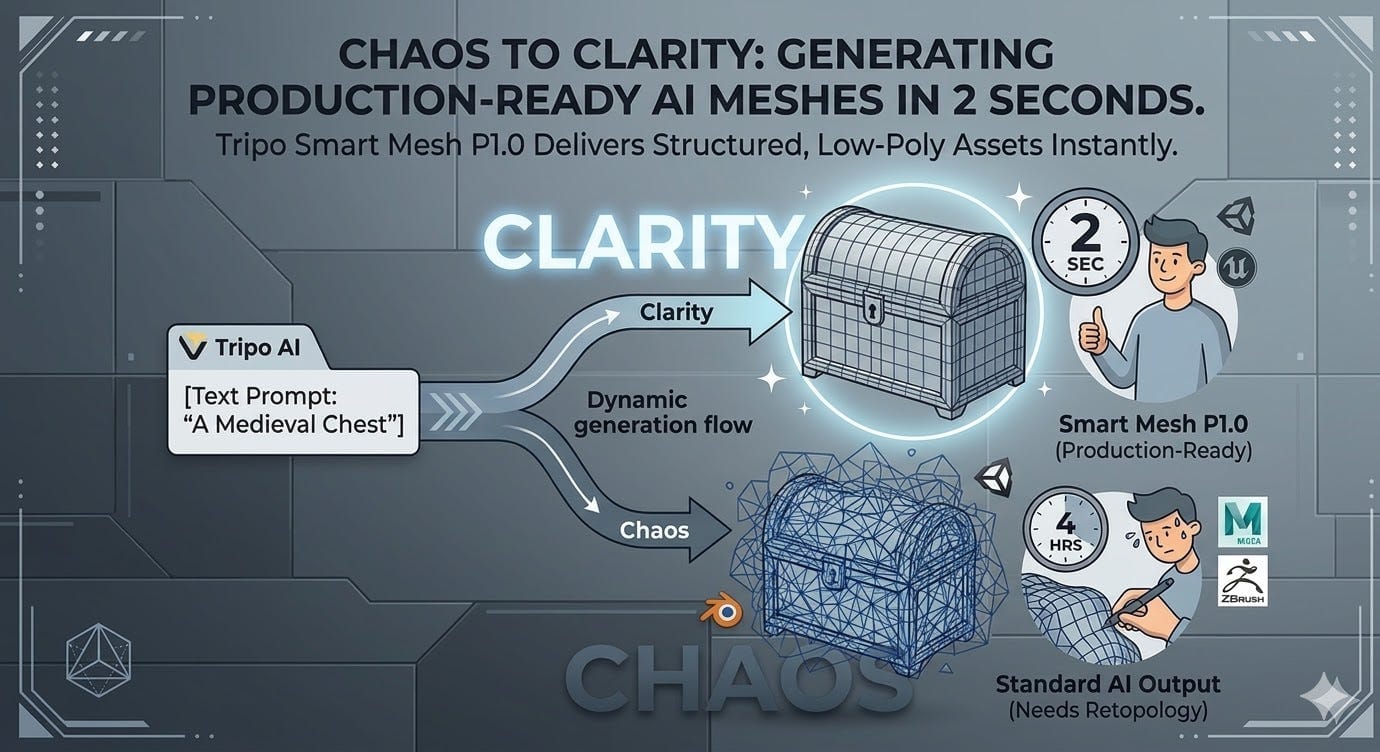
Tripo AI tackles this exact production bottleneck by generating engine-ready, quad-dominant geometry directly from text prompts or 2D concept art. Instead of spitting out unstructured triangle density or non-manifold geometry filled with inverted surface normals, the platform’s reconstruction pipeline calculates uniform polygon flow, sub-surface structure, and pre-baked PBR material channels. For technical artists integrating tools like SideFX Houdini and Substance 3D Painter, this removes the grueling step of manual mesh cleanup before testing props in a live scene.
Indie developers building fast-paced action titles—where rigid hitboxes and clean collision meshes dictate whether a sniper shot registers or clips through a wall—are already testing Tripo AI to prototype background props, weapon skins, and environmental clutter. By producing structured geometry that respects real-time rendering constraints, the tool bridges the gap between rapid concepting and production-ready engine assets.
How It Works: The Tech Behind Clean AI Topology
To understand why this tech matters, you have to understand topology in real-time rendering engines. In game development, an asset cannot just look convincing under static studio lighting; its underlying wireframe must flow logically across distinct polygon loops. Organic models require concentric quad edge loops around joints and facial features so they can deform without collapsing during skeletal animations. Hard-surface props like assault rifles, crates, and vehicles require clean rectangular faces with bevels that capture dynamic specular highlights without shading artifacts.
Standard generative diffusion models struggle with structural mechanics because they guess spatial volume rather than surface curvature. Tripo AI overcomes this by utilizing a two-stage generative architecture: a large reconstruction model creates the initial macro shape, followed by automated retopology algorithms that evaluate geometric tension and reconstruct the asset with quad-dominant flow. This keeps polygon budgets tightly controlled, preventing the massive VRAM spikes associated with unoptimized meshes.
The pipeline also automates the notoriously tedious steps of UV unwrapping and texture baking. When generating a prop, Tripo AI flattens the 3D surface into an organized UV coordinate map without the severe texture stretching common in automated tools. The system generates matching albedo, normal, and roughness maps aligned directly to that clean UV layout, delivering a model ready for PBR shaders and dynamic physics collisions inside Unreal Engine 5 or Unity.
What Changes for Players: Smoother Frame Rates and Denser Worlds
Clean topology is not just a behind-the-scenes quality-of-life upgrade for technical artists; it directly dictates in-engine frame pacing, VRAM consumption, and dynamic collision fidelity on your monitor or VR headset. When an engine renders a scene, every misaligned vertex and non-manifold face increases the computational burden on the GPU. Unoptimized geometry wrecks frame rates, especially when calculating dynamic global illumination via Unreal Engine 5’s Lumen or real-time ray-traced shadows in demanding titles like Remnant II.
Consider the direct gameplay impact of this pipeline shift:
Before (Manual Constraints & Raw AI Meshes): In sprawling open-world titles like The Elder Scrolls V: Skyrim, developers had to reuse the exact same clutter models hundreds of times across dungeons to preserve vertex budgets. When uncleaned generative meshes or unoptimized models are forced into an engine, irregular polygon densities bloat VRAM pools by hundreds of megabytes per room. Worse, jagged, non-manifold collision meshes lead to notorious gameplay bugs: walking near a dining table sends plates violently ricocheting across the room, sniper rounds clip invisibly through doorframes, and 1% low frame rates tank by 20 to 30 FPS during heavy combat.
After (Clean AI Pipeline Delivery): In modern survival crafting games like Enshrouded or fast-paced shooters like The Finals, an optimized generative pipeline allows artists to populate environments with hundreds of unique, clutter-level environmental props without inflating draw call overhead. Because the assets output with uniform quad flow and clean surface normals, engine auto-collision generators snap tight, simplified hulls to the mesh. The result is zero phantom projectile clipping, rock-solid 1% low frame rates, and dense, non-repetitive game spaces that run smoothly on mid-range GPUs like the Nvidia RTX 3060.

What Game Studios Are Building With the Tripo AI Pipeline
Game studios are not deploying generative 3D tools to replace lead character artists; they are plugging the Tripo AI asset pipeline directly into their rapid-prototyping toolchains to kill development downtime. In a traditional production cycle, taking an environmental prop from concept art to a textured, low-poly game asset can consume three to five days of an artist’s time. With Tripo’s API and web interface, technical teams feed 2D orthographic concept sketches directly into the pipeline to generate usable, engine-ready blockout meshes in under a minute.
Indie teams and modding communities working on large-scale custom maps for games like Ark: Survival Ascended utilize this speed to construct bespoke environmental set pieces, ruins, and non-interactive dungeon clutter. AAA studios are quietly leveraging the pipeline during pre-visualization and greybox level design, allowing level designers to populate playable test scenes with textured 3D assets to evaluate sightlines, player traversal metrics, and cover geometry before passing approved scenes to art departments for bespoke hero detailing.
Studios integrate this pipeline across several key game engine and middleware tools:
- Unreal Engine 5 (Nanite & Lumen): Teams import Tripo-generated FBX and GLTF models directly to verify how automated quad layouts interact with virtualized micro-polygon geometry and hardware-accelerated ray tracing.
- Unity Sentis: Technical developers run neural runtime models alongside procedural asset tools directly within Unity’s engine architecture.
- SideFX Houdini: Artists route clean base meshes from Tripo into Houdini to apply algorithmic weathering, dynamic destruction physics, and procedural level variations.
The Catch: Rigging Limits, Edge Flow Artifacts, and Studio Concerns
Despite the massive leaps in automated topology, generative 3D pipelines face severe technical roadblocks when applied to complex dynamic models. While Tripo AI handles static hard-surface props and rigid environment pieces with impressive precision, organic character models still fail critical deformation tests. High-stress articulation points—such as the double-jointed edge loops required around elbows, knees, and eyelids—rarely match the exacting topological standards demanded by senior character animators. When technical artists attempt to bind automated meshes to an Unreal Engine 5 Control Rig, extreme poses cause immediate vertex pinching, skinning tears, and erratic weight painting.
Players and developers also harbor justifiable skepticism toward over-automated asset workflows after high-profile industry missteps. The notorious launch of Grand Theft Auto: The Trilogy – The Definitive Edition serves as a prime case study in automated asset failure: algorithmic upscaling butchered character meshes with distorted limbs, detached hands, and nightmarish skeletal deformations that sparked immediate player backlash across the community.
Beyond rigging and vertex deformation, production pipelines frequently encounter texture baking artifacts. Automated AI UV unwrapping can create tiny texture seams and inverted normal maps along sharp hard-surface corners, causing dynamic lighting to reflect in reverse. Legal and ethical challenges also loom large: major studios remain hesitant to push AI-generated geometry directly into shipping commercial builds without transparent dataset provenance verifying that training data is free of non-consensual scrapes from platforms like Sketchfab and ArtStation.
What Comes Next: Real-Time Runtime 3D Generation in Games
The current implementation of the Tripo AI pipeline lives on the editor and prototyping side of game development, but technical directors are already looking toward runtime generative 3D. In procedural sandbox titles like No Man’s Sky or open-ended RPGs like Starfield, runtime procedural generation has historically relied on snapping together static, pre-modeled modular components. The next leap is true dynamic runtime generation: an in-game crafting bench where scavenged materials are synthesized on the fly into unique, fully textured weapon meshes with custom colliders and valid vertex data.
For runtime 3D generation to work inside active gameplay loops, inference speeds must drop from tens of seconds down to sub-100-millisecond frames to avoid hitching the game thread. Furthermore, automated skeletal auto-rigging and procedural hitboxes must advance to the point where an AI-generated creature can immediately receive physics ragdolls and navigation meshes without crashing the engine.
While generative platforms will never replace the creative vision of the art directors who craft iconic game aesthetics, clean quad pipelines like Tripo AI have pushed generative 3D from an unoptimized parlor trick into an indispensable development tool for modern game creation.
Frequently Asked Questions
What makes Tripo AI clean quad topology superior for Unreal Engine 5 and Unity projects?
Unlike early generative tools that output chaotic triangle clouds, Tripo AI structures meshes using uniform quad topology and organized edge loops. This structure allows Unreal Engine 5’s Nanite to virtualize geometry efficiently and enables Unity’s rendering pipeline to bake clean lightmaps without polygon pinches or lighting artifacts in demanding games like Remnant II.
How do Tripo AI assets impact real-time performance and frame pacing in games like Enshrouded?
Because Tripo AI exports clean geometry with predictable vertex budgets and pre-flattened UV layouts, game engines can auto-generate accurate collision hulls and manage dynamic LOD stepping seamlessly. In open-world games like Enshrouded, this prevents VRAM over-allocation, eliminates physics glitches caused by overlapping non-manifold faces, and stabilizes 1% low frame rates during heavy scene rendering.
Can Tripo AI generate fully rigged and animated characters for complex action games like Cyberpunk 2077?
Not yet without manual cleanup. While Tripo AI generates exceptional static props and basic creature silhouettes, high-deformation zones like facial eyelids and multi-axis joint loops still suffer from vertex pinching when bound to skeletal rigs like Unreal Engine 5’s Control Rig. For character-driven action titles on the scale of Cyberpunk 2077, technical animators must still manually refine automated edge loops to prevent the joint tearing seen in rushed releases like Grand Theft Auto: The Trilogy – The Definitive Edition.