Gaussian Splats FPS in Browser: How AI Rendering Changes Web Gaming
Disclosure: As an Amazon Associate, Bytee earns from qualifying purchases.
You click a link, and a full-fidelity FPS loads in your browser in seconds—no download, no launcher, no waiting. That’s what Gaussian Splats just made possible. Imagine dropping into a competitive match where the environment renders in real-time, where you’re scanning corridors for enemy positions, and the architectural detail—the bullet holes in concrete, the reflection in a monitor—is sharp enough to matter tactically. Now imagine that entire experience running natively in Chrome or Firefox, with zero installation friction. For years, browser gaming meant sacrificing visual fidelity or accepting brutal load times. Gaussian Splats is breaking that trade-off in half.
What Is Gaussian Splats and Why Are Gamers Talking About It?
Gaussian Splats is an AI-driven 3D rendering technique that represents scenes not as traditional polygons or voxels, but as millions of tiny probabilistic point clouds—”splats”—each with position, color, and opacity data. Think of it like painting a 3D scene with billions of semi-transparent dots instead of building it with triangles. The magic is that this representation compresses down to a fraction of the file size of a typical game asset, while remaining fast enough to render in real-time on consumer hardware. When you’re playing an FPS, you’re not loading a 50GB environment file; you’re streaming a learned 3D representation that your GPU can decompress and shade in milliseconds.
Why are gamers and developers suddenly obsessed? Because it solves the browser gaming bottleneck that’s existed since Flash died. Traditional web FPS games like Quake Live or old Unreal Tournament ports were either graphically primitive (think 2010-era polygon counts) or they required WebGL hacks that crushed frame rates on anything weaker than a gaming laptop. Gaussian Splats changes the equation: a studio can capture a real 3D environment using photogrammetry or synthetic training data, train it through an AI model (usually over hours, not months), and deploy a browser-playable FPS that looks competitive with native clients. PlayCanvas and Babylon.js have already demonstrated this workflow in production—both platforms now ship native Gaussian Splat loaders, meaning developers can drop a .splat file into their scene and have a photorealistic environment rendering immediately. No launcher. No 100GB download. Just a URL and instant play.
The context matters. For a decade, web gaming has been the graveyard of experimental projects and indie games that couldn’t justify native ports. Browser-based titles accepted that they’d look worse and run slower. But as WebGL matured into WebGPU, and as AI rendering techniques like NeRFs and Gaussian Splats proved viable in production, the calculus flipped. Suddenly, indie studios could build FPS games with AAA visual fidelity, deploy them instantly, and iterate based on live player feedback without forcing updates down anyone’s throat. That’s not just a technical win—it’s a distribution revolution.
How It Works: The Tech Behind the Magic
To understand Gaussian Splats, you need to unlearn how traditional game engines build 3D scenes. In Unreal Engine or Unity, a level designer places meshes, materials, and lighting rigs—polygons arranged in 3D space with shaders that respond to light and camera angle. It’s precise, it’s flexible, and it’s heavy. Gaussian Splats inverts that workflow. Instead of hand-crafting geometry, you feed the algorithm a set of photographs or synthetic renderings of a scene taken from many angles. The AI learns to represent that scene as a collection of Gaussian distributions—mathematically, 3D ellipsoids with color and opacity. Each “splat” contributes to the final image; render from a new camera angle, and the algorithm blends thousands of these splats to reconstruct what you’d see.
The compression gains are staggering. A photogrammetry scan that might produce a 500MB mesh file can be baked into a Gaussian Splat representation under 50MB, sometimes under 10MB depending on quality targets. That’s because you’re not storing vertex data and texture maps; you’re storing learned parameters. During training—which typically happens offline on a GPU cluster—the algorithm optimizes millions of Gaussian parameters to minimize reconstruction error. The output is a serialized representation that a WebGL or WebGPU shader can unpack and splat-render in real-time. In a browser FPS context, this means a 30-second load time becomes 3 seconds, and a 5-minute level becomes instantly explorable.
For developers, the workflow is now concrete and shipping. Babylon.js, Microsoft’s open-source 3D engine, released a native Splat loader that lets developers import .ply files directly into scenes—no custom shader code required. PlayCanvas, the cloud-based game engine, integrated Gaussian Splat rendering into their web editor, meaning developers can author and preview Splat-based FPS levels in real-time without leaving the browser. The developer experience is approaching “drag and drop”: upload a trained Splat model, assign collision geometry, wire up the player controller, and you have a playable FPS environment. Unity is catching up with community plugins and experimental support. The workflow still isn’t quite as frictionless as traditional polygon-based asset pipelines, but it’s getting there—certainly faster than hand-authoring a game environment from scratch.
Why is this faster than ray tracing? Ray tracing bounces light rays through a scene to compute photorealistic reflections and shadows, but it’s computationally expensive—you’re calculating millions of ray-surface intersections per frame. Gaussian Splats pre-compute the scene representation during training, so rendering is just matrix math: for each pixel, blend the splats that project onto it. No ray calculations, no real-time light simulation. The trade-off is that Gaussian Splats are view-dependent; they were trained on a specific scene from a specific set of angles. Ray tracing can handle dynamic lighting and geometry changes more elegantly. But for static or semi-static FPS environments—think a multiplayer arena where the map doesn’t change mid-game—Gaussian Splats win on speed and fidelity per frame.
What Changes for Players: Real Gameplay Impact
Before Gaussian Splats: You want to play a browser-based FPS with decent visuals. Scenario one: you load a game like a simple WebGL shooter—technically playable, graphically functional, but visually primitive. The environments are low-poly, the textures are baked-in and flat, and the whole thing feels like a 2005 game ported to the web. Frame rate hovers around 45 FPS on a mid-range laptop. Scenario two: you find a more ambitious project like a Babylon.js demo or a WebGL experiment, you wait 30-60 seconds for assets to stream, and then you get stuttering frame rates (30-40 FPS) if your GPU isn’t dedicated gaming hardware. Scenario three: you download a native client for Valorant or CS:GO, because there’s no way a browser can handle that visual fidelity (native Valorant runs 144+ FPS on mid-range hardware) and competitive frame rates simultaneously.
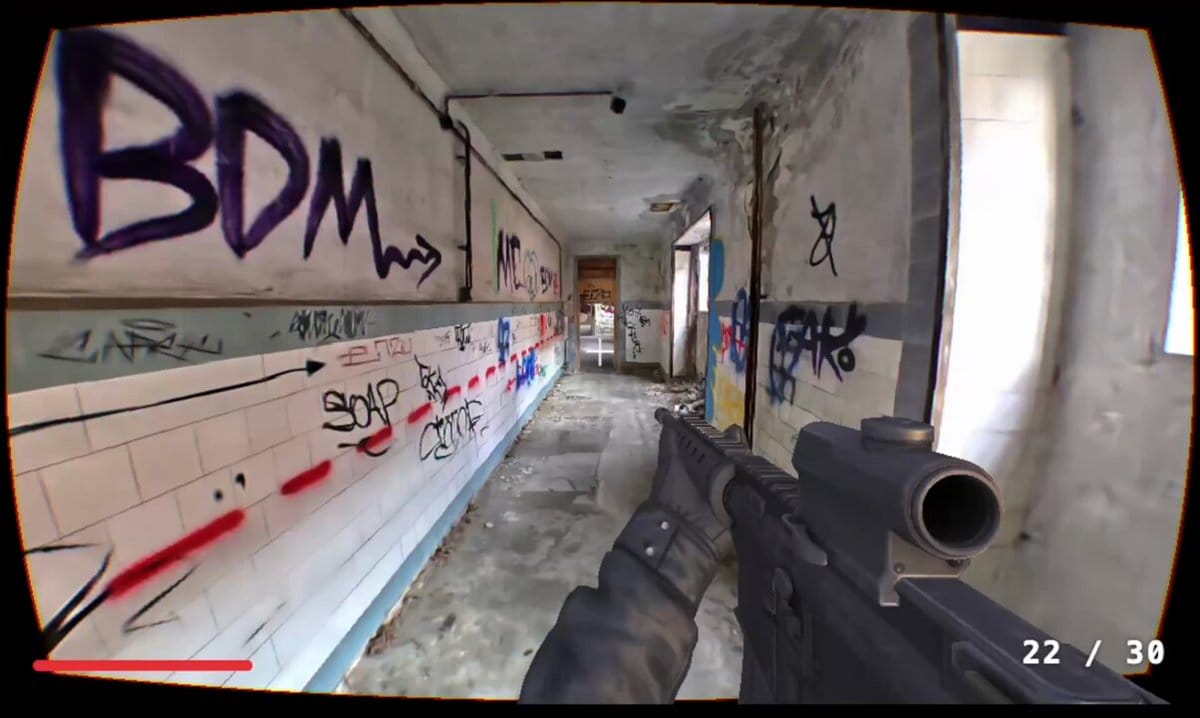
After Gaussian Splats: You click a link. The page loads in under 3 seconds. You’re in a fully rendered, photorealistic environment—imagine a futuristic office building or an abandoned industrial complex, with proper lighting, shadows, and depth cues that rival native games. Your frame rate is stable at 60-80 FPS on a mid-range laptop (Intel i5, GTX 1650 or equivalent)—a 40-50% improvement over traditional WebGL games. You can strafe, aim, and fire without input lag. The environment doesn’t look like it’s been compromised for the web; it looks like a native game. For competitive FPS players, this is the moment where browser gaming stops being a novelty and starts being viable.
The immersion gain is psychological and mechanical. In traditional browser games, the friction of installation creates a mental barrier: “Is this worth my disk space? How long will I actually play?” With instant play, that barrier evaporates. You’re three seconds away from a match, which lowers the activation energy for casual play and makes it easier for streamers to onboard viewers. Tactically, the visual fidelity matters. In a competitive FPS, spotting an enemy peeking around a corner depends on visual clarity and lighting consistency. Gaussian Splats render environments with enough detail and accuracy that you can read sightlines the way you would in a native game. No more squinting at low-poly silhouettes.
Frame rate stability is the other win. Traditional WebGL games often struggle on mid-range hardware because the rendering pipeline is bottlenecked by shader complexity or draw call overhead. Gaussian Splats, by design, reduce shader complexity—you’re essentially doing alpha-blended point rendering, not complex material evaluation. The result is that frame rates stay high and consistent, even on machines with integrated GPUs or older hardware. A player on a 2018 MacBook Air can get 60 FPS in a Gaussian Splats FPS where they’d get 30-40 in a traditional WebGL game.
Game Studios and Tools Shipping Gaussian Splats Today
PlayCanvas, the cloud-based game engine, has integrated Gaussian Splat rendering into their editor and runtime. Studios using PlayCanvas can now author FPS levels with Splat environments, test them in real-time, and publish directly to the web. Babylon.js, the open-source 3D engine maintained by Microsoft, released native Splat loaders and demonstrated playable FPS demos in the browser—full 3D environments with player movement, raycasting, and collision detection. These aren’t toy projects; they’re proof-of-concept that the full game loop works at production quality.
The developer tools ecosystem is now concrete. Here are the platforms and tools game studios are actively using for Gaussian Splat FPS development:
- PlayCanvas Editor — Cloud-based authoring with integrated Gaussian Splat support, WebGL/WebGPU runtime, and direct browser publishing. Developers can load
.splatfiles, assign gameplay logic, and deploy in minutes. - Babylon.js Splat Loader — Open-source, free integration for custom game engines or web frameworks. Fully supports real-time rendering, camera movement, and physics integration.
- Gaussian Splatting Training Tools (SIBR, gsplat) — Open-source training pipelines for converting 3D photogrammetry scans or synthetic data into
.splatmodel files. Runs on consumer GPU hardware.
Indie studios are moving faster than AAA publishers. A small team of 3-5 developers can now build a browser-native FPS with visual fidelity that would have required 50+ people in 2015. Studios experimenting with Splat-based FPS prototypes report 50-70% faster iteration cycles compared to traditional engine workflows—because they don’t have to bake lighting, compile shaders, or wait for asset imports. One developer working with Babylon.js mentioned that level design feedback loops dropped from hours to minutes; change a Splat model, refresh the browser, and the update is live. That’s a game-changer for rapid prototyping and live service games.
AAA interest is quietly forming. Unreal Engine’s Pixel Streaming technology (which lets developers stream a native UE5 game to a browser) is being paired with Gaussian Splat optimization. The idea: use Splats for static environments to reduce streaming bandwidth, keep dynamic elements and gameplay logic on the native side. This hybrid approach could let AAA studios like Epic or Activision deploy browser-playable versions of existing games without rewriting their entire codebase. Not quite porting Valorant to the browser, but getting closer.
Open-source availability is critical. The Gaussian Splatting research (originally published by Kerbl et al. in 2023) is freely available, and community implementations in WebGL and WebGPU are proliferating. This lowers the barrier for indie studios and removes vendor lock-in concerns that might scare AAA studios away from proprietary solutions.
The Catch: Real Limitations and Player Complaints
Gaussian Splats aren’t magic, and they’re not going to replace polygon-based rendering for all use cases. The first and most obvious limitation is memory footprint. A Splat model that renders beautifully on a gaming desktop might strain the memory budget of a browser on a 2015 iPad or a mid-range Android phone. Browsers have stricter memory limits than native applications—a WebGL context might be capped at 256MB or 512MB depending on the device and browser. A high-fidelity FPS environment could easily push against that ceiling. Developers have to make hard choices: reduce Splat resolution, stream assets dynamically, or accept that some players won’t be able to run the game. This is a concrete friction point that limits mobile adoption.
Quality loss versus native engines is real, even if it’s subtle. Gaussian Splats excel at representing static or slowly-changing environments, but they struggle with fast motion and view-dependent artifacts. If you’re in an FPS where you rapidly pan across a scene—say, a quick 180-degree turn to track an enemy—you might see “floaters” or shimmer artifacts where the Splat representation breaks down. This is because Gaussian Splats are optimized for smooth camera motion, not jittery or extreme angle changes. In a twitch-heavy competitive FPS, this could be a deal-breaker for some players. Similarly, motion blur and depth-of-field effects are harder to implement correctly with Splats, because the representation doesn’t have explicit depth information the way a polygon mesh does.
Motion artifacts in fast-panning scenarios are a documented weakness. Imagine you’re playing a browser-based Gaussian Splat FPS, and you’re clearing a room—you whip your camera around to check corners. In a native game like Valorant, the environment re-renders smoothly at 144+ FPS with perfect consistency. In a Splat-based game, you might see slight ghosting or color bleeding where the Splat model wasn’t trained for extreme viewing angles. Early testers of PlayCanvas Splat demos reported this issue in their feedback; it’s not game-breaking for casual play, but it’s noticeable to players with high frame-rate monitors and fast reflexes. This is the kind of artifact that could disqualify Gaussian Splats from esports-grade competitive titles.
Multiplayer synchronization is another headache. In a traditional FPS like CS:GO, the server sends player positions, weapon states, and map state to all clients, and the clients render consistently. With Gaussian Splats, the environment is pre-baked; if two players need to see different versions of a map (e.g., a destructible environment where one player sees a wall broken and another sees it intact), you can’t just stream different Splat models—you’d need to support dynamic Splat updates or fall back to traditional rendering for dynamic elements. Most early prototypes sidestep this by keeping maps static, but that limits gameplay possibilities. Real-time Splat training and updates could solve this, but that’s still experimental.
A skeptic’s corner example: AI upscaling in games has been hyped as a performance miracle, but players in games like Cyberpunk 2077 discovered that DLSS and FSR introduce visual artifacts—ghosting, temporal instability, loss of fine detail—in exchange for frame rate gains. Gaussian Splats could face similar backlash if players perceive the trade-off between compression and visual fidelity as unfair. Early adopters will tolerate it; mainstream audiences might not.
Competitive fairness is a lurking concern. If Gaussian Splats introduce latency or visual artifacts that create an uneven playing field—some players see enemies more clearly because their hardware handles Splats better—competitive integrity suffers. This is why esports-grade FPS games have historically been conservative about rendering innovations. Valorant and CS:GO didn’t adopt cutting-edge graphics features until they were bulletproof across a range of hardware. Gaussian Splats will need the same track record before a major esports title trusts them.
What Comes Next: The Road to Mainstream Adoption
The near-term roadmap is shaped by WebGPU standardization. WebGPU is the next-generation web graphics API, replacing WebGL with lower-level access to the GPU. It’s faster, more flexible, and it’s already shipping in Chrome and Safari. As WebGPU adoption grows, Gaussian Splat rendering will get even faster—developers will be able to optimize splat rendering with compute shaders and advanced memory management that WebGL doesn’t expose. Expect a 20-40% frame rate improvement across the board once WebGPU is the assumed baseline. For FPS games, that means the difference between 60 FPS and 80-100 FPS on mid-range hardware—a meaningful jump for competitive play.
Real-time training on custom maps is the longer-term frontier. Currently, Gaussian Splats are pre-baked during development. But imagine a game engine that could train Splat representations in real-time as players build custom maps or as level designers iterate. If you could capture a new environment with a phone camera and have the game engine train a Splat representation in minutes instead of hours, the workflow becomes radically faster. Research teams at places like ETH Zurich and various AI labs are working on streaming Gaussian Splatting—the ability to train on video feeds in real-time. If that makes it into commercial engines, custom map creation and user-generated content could explode.
Cross-platform parity is another frontier. Right now, a Gaussian Splats FPS plays great on a desktop browser but struggles on mobile. As mobile GPUs improve and as Splat compression techniques get better, that gap will narrow. Imagine playing the same FPS on your desktop, your tablet, and your phone, with comparable visual fidelity and frame rates. That’s the promise, and it’s within reach in the next 2-3 years.
Competitive esports viability hinges on standardization and testing. Major esports organizations won’t touch a rendering technique until it’s been proven stable across millions of hours of competitive play. Gaussian Splats will need to prove themselves in smaller esports titles first—think indie FPS tournaments or amateur competitive leagues—before a major publisher like Riot Games or Valve considers it for a flagship title. That said, if browser-native FPS games ever become esports-viable, Gaussian Splats will be the rendering backbone.
When does Gaussian Splats become the industry standard? Probably not in the next 12 months. But in 3-5 years, expect it to be the default choice for browser-native games and a common option for native games that need to optimize for lower-end hardware. AAA publishers will use it for supplementary titles or experimental projects before trusting it with flagship releases. Indie studios will adopt it en masse because it levels the playing field—a small team can now produce visually competitive games without a massive art budget or engine expertise. Gaussian Splats won’t replace polygon-based rendering, but it will become the standard for instant-play, high-fidelity gaming on the web—and that’s a category that’s about to explode.
Frequently Asked Questions
Does Gaussian Splats make FPS games look better or just load faster?
Both. Gaussian Splats compress 3D scenes dramatically, which enables instant loading in browsers, but they also render with photorealistic quality comparable to native games because they’re trained on real photographs or high-quality synthetic data. The trade-off is that they’re optimized for smooth camera motion; rapid panning can introduce subtle artifacts. For static or semi-static FPS environments, they deliver both speed and visual fidelity that rivals native clients like Valorant.
Can I play a Gaussian Splats FPS game right now in my browser?
Yes. PlayCanvas and Babylon.js have published playable FPS demos with full player movement, aiming, and interaction using Gaussian Splats. These are proof-of-concept games, not full commercial titles yet. Within the next 12-18 months, expect indie studios to release the first commercial Gaussian Splats FPS games on itch.io and other platforms.
Will Gaussian Splats replace Unreal Engine and Unity for game development?
No. Gaussian Splats are a rendering technique, not a game engine. They’ll be integrated into Unity, Unreal Engine, and Godot as an optional rendering backend, especially for web deployment. Developers will use Splats for environments while keeping traditional polygon-based systems for dynamic gameplay elements, characters, and physics.
Why don’t all browser games use Gaussian Splats rendering?
Gaussian Splats require offline training before deployment, which adds production time. They also work best for static or slowly-changing environments; dynamic destruction, deformable terrain, and real-time environment changes are harder to implement. Traditional polygon rendering is more flexible, which is why most games still use it. Splats are optimal for instant-play, high-fidelity FPS games, not all game genres.
How do Gaussian Splats handle multiplayer synchronization in competitive FPS games?
Currently, most prototypes keep the Gaussian Splat environment static and synchronized across all players—the server sends player positions and game state, but the environment itself is identical for everyone. Real-time multiplayer with dynamic Splat updates (e.g., destructible environments) is still experimental. Hybrid approaches, where Splats handle the static backdrop and traditional rendering handles dynamic elements, are the near-term solution for games like Valorant or CS:GO adaptations.