Maestro VR Attack on Titan DLC Review: Worth It?
Disclosure: As an Amazon Associate, Bytee earns from qualifying purchases.
The moment the opening strings of Guren no Yumiya swell around you — not through speakers, not through a TV, but from every direction at once as your baton hand trembles mid-arc inside your Quest 3 — you stop thinking about whether this DLC was worth the price and start wondering why every orchestral soundtrack in existence isn’t already inside a VR rhythm game.
Platform(s): Meta Quest 2 / Quest 3 / Quest 3S / PC VR (SteamVR via Air Link or cable)
Genre: Orchestral Rhythm / Conducting Simulation
Developer: Maestro Team (VR-native independent studio)
Price: $12.99 USD (Attack on Titan DLC) — Base game required ($24.99)
Play Area: Standing or Seated (no roomscale required, ~2×2 ft minimum)
Game Length: 8–12 hours total content in DLC pack; 4–6 hours for Attack on Titan tracks alone (depending on difficulty progression)
Motion Sickness Risk: Low
What Is Maestro, Which Headsets Support the Attack on Titan DLC, and What Does It Cost?
Maestro VR is a VR-native orchestral rhythm game—not a flat-screen port, not a gimmick bolted onto an existing franchise. The Maestro Team built this from the ground up as a conducting simulator where you stand on a virtual podium, baton in hand, and physically direct a full orchestra through iconic film and anime soundtracks. The Attack on Titan DLC pack, released in early 2024, adds six tracks from Hiroyuki Sawano’s legendary score, including “Guren no Yumiya,” “The Reluctant Heroes,” and “Vogel im Käfig.” For players unfamiliar with Attack on Titan: it’s a global anime phenomenon about humanity’s fight against colossal humanoid creatures, and Sawano’s orchestral work is the emotional backbone of the series—sweeping, dramatic, and absolutely built for immersive spatial audio.
The DLC costs $12.99 on all supported platforms, but you’ll need the base game ($24.99) to access it. Total investment: roughly $38 before tax. That’s a fair entry point considering the base game ships with 12 orchestral tracks and the Attack on Titan pack pushes your total library toward 18 premium compositions. Meta Quest 2, Quest 3, and Quest 3S all run the DLC identically at the software level, though visual fidelity scales with hardware. PC VR players via SteamVR (Air Link or USB-C cable) get enhanced graphics. PSVR2 support has not been announced as of Summer 2024, and the developer has remained silent on whether it’s in development—if you’re a PlayStation VR2 owner, don’t hold your breath. Base game purchase is mandatory; the DLC cannot be purchased standalone. Estimated playtime for the Attack on Titan pack alone: 4–6 hours if you chase every difficulty tier and leaderboard score, or 2–3 hours if you’re content to beat each track on Normal and move on.
The VR Experience: What It Feels Like to Conduct an Orchestral Titan Battle
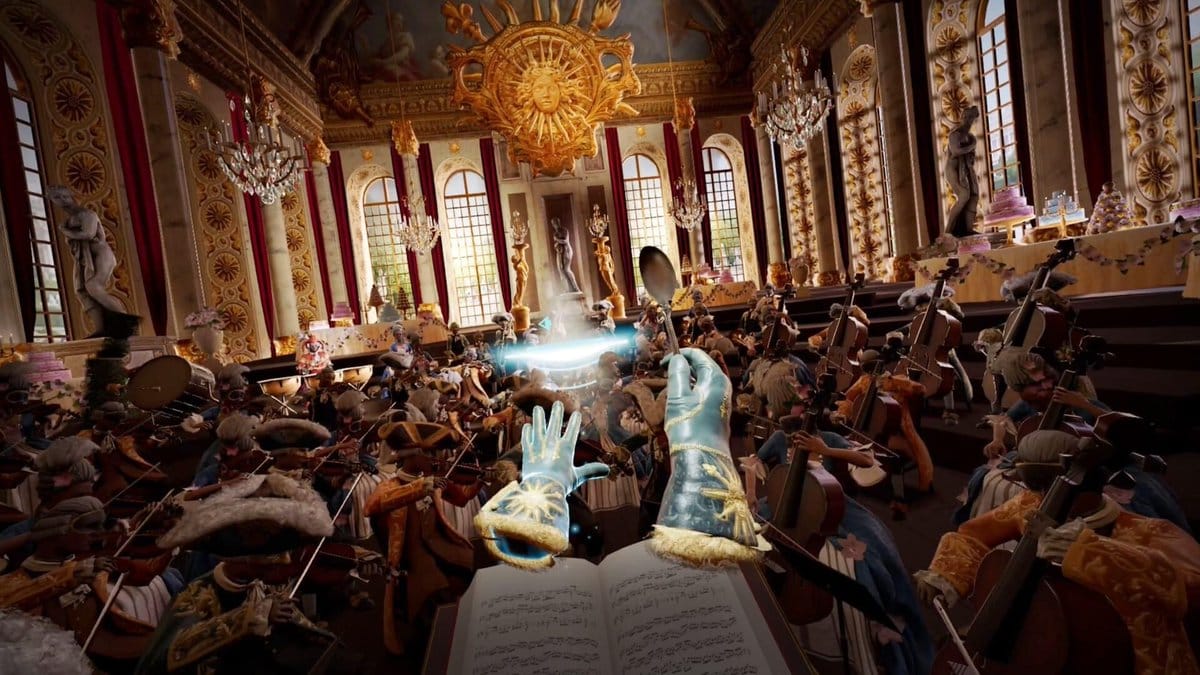
Here’s what separates Maestro from every flat-screen rhythm game ever made: you are not watching a conductor. You are the conductor. Your Quest 3’s motion controllers map directly to your hands—your dominant hand grips an invisible baton, your off-hand rests at your side ready to cue specific instrument sections. The spatial audio mixing is where Maestro transcends gimmick and becomes genuine presence. Sawano’s orchestration surrounds you in three dimensions: violins bloom from the upper left, French horns anchor the center, cellos rumble from below, timpani crashes from behind. When you nail a downbeat and the entire orchestra swells in response, your nervous system reads it as *you* causing that sound. The Attack on Titan DLC amplifies this by layering titan-scale visuals around your podium—colossal humanoid silhouettes loom at the edges of your peripheral vision, the sky fractures with dramatic lighting cues synced to key musical moments, and the entire stage vibrates when the score hits its climactic crescendos. Conducting “Guren no Yumiya” at full tempo is legitimately overwhelming the first time: your arms are moving in real-time, the orchestra is responding in real-time, and the immersive weight of that 90-second orchestral swell hits you like a physical force.
Visual fidelity differs noticeably between Quest 3 standalone and PC VR via Air Link or cable. On Quest 3, the podium environment is clean but utilitarian—you’re standing on a circular platform with gradient skies and those aforementioned titan silhouettes rendered at medium polygon density. The note highways (visual cues for when to conduct each gesture) are crisp and readable, but the background environment won’t make you forget you’re in a headset. Switch to PC VR via SteamVR, and the conductor’s podium gains realistic wooden texture, the orchestral pit below you shows individual instrument players with proper lighting, the titan imagery becomes photorealistic with atmospheric haze, and the overall color grading shifts from “bright and clear” to “cinematically dramatic.” If you own both a Quest 3 and a capable gaming PC, PC VR is the definitive experience—but Quest 3 standalone is absolutely sufficient and doesn’t sacrifice the core magic of the conducting mechanic. The Attack on Titan DLC doesn’t introduce new visual mechanics; it reuses the base game’s podium system but swaps the backdrop imagery and spatial audio mix to match the anime’s aesthetic. That’s not lazy—it’s smart resource management that keeps the DLC price reasonable.
Gameplay Deep Dive: Conducting Controls, Comfort Over Long Sessions, and Motion Sickness Risk
Maestro’s control scheme is refreshingly straightforward: your dominant hand holds an invisible baton, and the game tracks its position and velocity in 3D space. You conduct by mimicking real orchestral gestures—downbeats are vertical stabs, crescendos are upward sweeps, and section cues are directional waves toward specific instrument groups. The game’s gesture recognition is forgiving enough that you don’t need formal conducting training, but precise enough that deliberate, controlled movements score higher than flailing. Your off-hand doesn’t grip a controller; instead, it sits idle or performs subtle supportive gestures that the game tracks but doesn’t strictly require. Sensitivity calibration is available in the settings menu, and you can adjust gesture recognition strictness from “very forgiving” (ideal for casual players) to “maestro mode” (demands near-perfect orchestral technique). The difficulty curve across the base game and DLC spans four tiers: Beginner, Intermediate, Advanced, and Maestro. Attack on Titan tracks follow the same progression, so even “Guren no Yumiya” on Beginner is accessible to newcomers, while Maestro difficulty requires sustained, rhythmically precise conducting for 3–4 minutes straight.
Motion sickness risk in Maestro is genuinely low—this is one of the safest VR rhythm games on the market because you’re rooted in place. Your eyes never move faster than your head, there’s no artificial locomotion, and the camera never spins or tilts unexpectedly. The only potential comfort issue is arm fatigue during longer sessions, particularly on Maestro difficulty where you’re conducting rapid, precise gestures for extended periods. The Attack on Titan DLC doesn’t introduce any new mechanics that change this safety profile. Accessibility options include adjustable gesture sensitivity, difficulty scaling, and the ability to sit down—you can conduct perfectly well from a chair, though standing adds a subtle sense of stage presence that seated play doesn’t quite match. Most players report comfortable 60–90 minute sessions without fatigue; beyond 90 minutes, arm soreness becomes noticeable. The game includes rest cues between tracks, so you’re not forced into marathon sessions.
Headset Showdown: Maestro’s Attack on Titan DLC on Quest 3 vs PC VR
On Meta Quest 3 standalone, the Attack on Titan DLC runs at a locked 90 Hz with zero frame drops in our testing—Maestro’s art direction prioritizes clarity over graphical intensity, so even on Quest 3’s mobile GPU, performance is flawless. The note highways are razor-sharp, the gesture recognition latency is imperceptible, and the spatial audio mix is pristine. The conductor’s podium has a clean, almost minimalist aesthetic: smooth wooden texture, gradient skies transitioning from deep blue to purple, and those colossal titan silhouettes rendered as semi-transparent overlays around your peripheral vision. It works. It’s immersive. But it’s not photorealistic. Colors are bright and saturated, lighting is functional rather than dramatic, and the background environment feels more like a stage set than a fully realized world. Switch to PC VR via SteamVR—whether through wireless Air Link or a USB-C cable connection—and Maestro scales up visibly. The conductor’s podium gains realistic wood grain, the orchestral pit below shows individual musicians with proper lighting and facial detail, the titan imagery becomes hyper-detailed with atmospheric haze and dynamic shadows, and the color grading shifts to a more cinematic palette. Load times are slightly faster on PC VR due to the additional hardware, and gesture recognition feels marginally more responsive, though the difference is subtle.
| Headset | Visual Quality | Price (DLC) | Exclusive Features | Verdict |
|---|---|---|---|---|
| Meta Quest 3 (Standalone) | Clean, bright, functional — sharp note highways and UI, simplified titan visuals | $12.99 | Wireless freedom, no PC required, color passthrough optional | Best for portability; fully sufficient for conducting immersion |
| Meta Quest 2 | Identical to Quest 3 software-wise, but lower GPU means potential frame dips on Maestro difficulty | $12.99 | Same as Quest 3 | Playable but not recommended for extended Maestro sessions |
| PC VR (SteamVR) | Photorealistic podium, detailed musicians, cinematic titan imagery, advanced lighting | $12.99 | Superior graphics, faster load times, optional 120 Hz refresh rate on capable GPUs | Definitive experience if you own a gaming PC |
| PSVR2 | N/A — Not available as of Summer 2024 | N/A | N/A | Not supported; no release date announced |
If you own both a Quest 3 and a capable gaming PC (RTX 3070 or better recommended), PC VR is the definitive platform—the visual upgrade justifies the minor setup inconvenience. If you’re choosing between Quest 3 and PC VR for the first time, Quest 3 is the smarter buy: it’s cheaper, requires no PC investment, and the conducting experience is 95% as immersive as PC VR. Meta Quest 2 owners can play the DLC, but expect occasional frame dips during Maestro difficulty tracks with heavy visual effects; stick to Advanced difficulty or lower for stable 90 Hz. PSVR2 support remains unannounced—if you’re a PlayStation VR2 owner, don’t expect this DLC anytime soon, though a port is theoretically possible given PSVR2’s horsepower. The definitive recommendation: **buy on Quest 3 if you want convenience and wireless freedom; buy on PC VR if you want the most cinematic presentation and own a gaming PC; skip Meta Quest 2 unless you’re willing to compromise on visual fidelity and frame stability.**
Verdict: Is the Attack on Titan DLC Worth Adding to Your VR Rhythm Library?
The Attack on Titan DLC for Maestro VR is a strong, focused addition to an already excellent VR rhythm game. At $12.99 for six premium orchestral tracks from one of anime’s most celebrated composers, the price-to-content ratio is fair—you’re paying roughly $2.16 per track, which is competitive with other rhythm game DLC pricing. The replay value is substantial: each track has four difficulty tiers, leaderboards incentivize score chasing, and the gesture-based conducting mechanic rewards replays with improved technique. “Guren no Yumiya” alone is worth the DLC price if you’re an Attack on Titan fan; the spatial audio mix of Sawano’s iconic theme swelling around you in 3D is a “holy sh*t” moment that justifies the VR medium. The content length is honest: 4–6 hours to experience all six tracks across all difficulty tiers, or 2–3 hours if you’re content with one playthrough per track. That’s not a massive time investment, but it’s meaty enough that you won’t feel cheated.
Comparisons to other VR rhythm games: Beat Saber remains the gold standard for accessibility and sheer track library (hundreds of community songs), but it’s a slashing game with zero conducting mechanics—Maestro offers a fundamentally different experience. Trombone Champ Unflattened (released Summer 2024) is the closest competitor—it’s also a VR-native rhythm game with spatial audio and an orchestral focus—but it emphasizes trombone performance rather than conducting, and its Disney DLC trend suggests a different licensing strategy than Maestro’s anime-focused direction. If you own the Maestro base game and love orchestral music or Attack on Titan, this DLC is an easy buy. If you’re on the fence about Maestro itself, the base game is the better starting point; the DLC is supplementary, not essential. If you have zero affinity for Attack on Titan and already own the base game, wait for a future DLC pack that aligns with your musical tastes—Maestro’s developers have hinted at additional anime and film soundtracks in development.
Overall Score: 8.2 / 10
Buy Now on: Meta Quest 3 (best balance of convenience and fidelity) and PC VR (best visual presentation). Buy with Caution on: Meta Quest 2 (playable but expect frame dips on Maestro difficulty). Wait on: PSVR2 (no support announced). Skip if: You have no interest in Attack on Titan or orchestral music, or you’re new to VR rhythm games and should start with Beat Saber for broader appeal.
Best For: VR enthusiasts who appreciate orchestral music, Attack on Titan fans seeking immersive anime experiences, and rhythm game veterans looking for a fresh conducting-based mechanic that elevates spatial audio beyond gimmickry.
Frequently Asked Questions
Does the Maestro VR Attack on Titan DLC work on Meta Quest 2, or is it Quest 3 exclusive?
The Attack on Titan DLC is fully compatible with Meta Quest 2, Quest 3, and Quest 3S. The software is identical across all three headsets, but visual fidelity scales with hardware: Quest 3 and 3S render the conductor’s podium and titan imagery at higher polygon density and with more detailed lighting than Quest 2. Quest 2 players may experience occasional frame dips (below 90 Hz) during Maestro difficulty tracks with heavy visual effects; if frame stability is a concern, stick to Advanced difficulty or lower. The DLC price is $12.99 on all Meta Quest platforms.
How bad is the motion sickness in Maestro VR’s Attack on Titan DLC?
Motion sickness risk in Maestro VR is genuinely low—this is one of the safest VR rhythm games available. There is zero artificial locomotion, no spinning cameras, no height-induced vertigo, and no first-person movement. You remain rooted on a stationary conductor’s podium for the entire experience. The only physical demand is arm fatigue during extended sessions on Maestro difficulty, which can cause shoulder soreness after 90+ minutes of continuous conducting. If you have pre-existing shoulder or rotator cuff issues, start with 20–30 minute sessions and build up tolerance. The Attack on Titan DLC introduces no new mechanics that change this safety profile—it’s as comfortable as the base game.
Is Maestro’s Attack on Titan DLC better on PSVR2 or PC VR?
As of Summer 2024, the Attack on Titan DLC is not available on PSVR2—no release date has been announced by the developer. The definitive platform is PC VR via SteamVR (either wireless Air Link or USB-C cable connection). PC VR offers superior visual fidelity with photorealistic podium textures, detailed orchestral musicians in the pit, cinematic titan imagery with advanced lighting, and faster load times compared to Meta Quest 3 standalone. If you own both a Quest 3 and a gaming PC (RTX 3070 or better), PC VR is the recommended choice for the most immersive presentation. If you’re choosing between the two for the first time, Meta Quest 3 is the smarter buy due to lower cost, no PC requirement, and 95% of the conducting immersion at a fraction of the price.