Klipsch Pro Media Lumina Review: Tested for Gaming 2025
Disclosure: As an Amazon Associate, Bytee earns from qualifying purchases.
The moment a Helldivers 2 orbital strike lands and you feel almost nothing through your desk, you realize the Klipsch Pro Media Lumina has a problem — and it lives in that sleek, compact subwoofer sitting quietly at your feet.
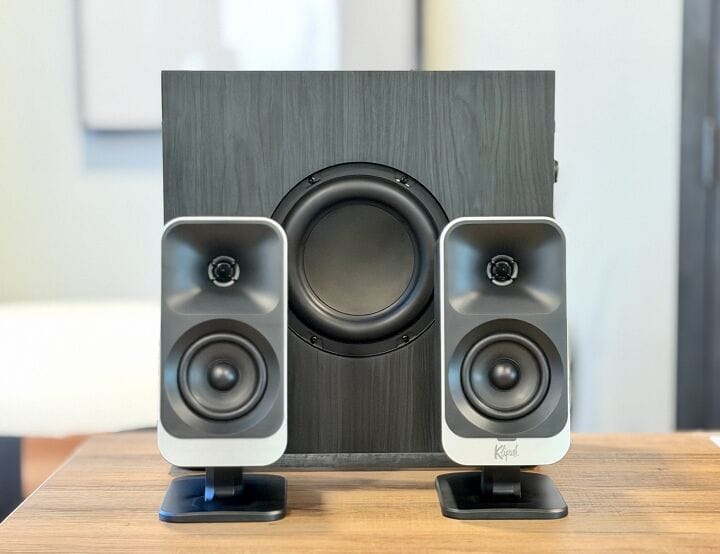
I’ve spent the last three weeks running the Klipsch Pro Media Lumina through everything from ambient exploration in Baldur’s Gate 3 to the relentless chaos of Valorant ranked matches, and I need to be straight with you: this is a speaker system that delivers strong midrange clarity while stumbling hard on bass extension. The $169.99 price tag puts it squarely in the sweet spot for PC gamers tired of tinny monitor speakers but not ready to drop $300+ on a real studio setup. But that subwoofer — that’s where the promise breaks down.
Who Is This Gear For? First Impressions and Target Buyer
The Klipsch Pro Media Lumina is built for a specific gamer: someone who sits at a desk, doesn’t have a ton of space, and cares more about clarity and aesthetics than feeling explosions in their chest. If you’re a casual to mid-tier PC gamer who plays story-driven games, competitive shooters where footstep audio matters, or you stream content creation work alongside gaming, this system speaks your language. It’s not for the bass-head who wants a subwoofer that rattles their monitor. It’s for the person who opens a new gaming PC build and thinks, “I need something that looks intentional, not like a college dorm setup.”
The unboxing experience tells you Klipsch knows its audience. This isn’t some flimsy cardboard situation with styrofoam peanuts. The satellite speakers come wrapped in protective foam, and the whole package feels premium for the price point. Both satellite speakers feature that signature Klipsch horn-loaded tweeter design — a curved horn that focuses high-frequency sound — and they’re finished in a matte black with a fabric grille cloth that fits seamlessly into clean desk builds. The subwoofer is impressively slim, designed to slide under a desk rather than dominate the floor space. It’s the kind of thinking that matters when you’ve got a 2×2-foot desk and cable management is already a nightmare.
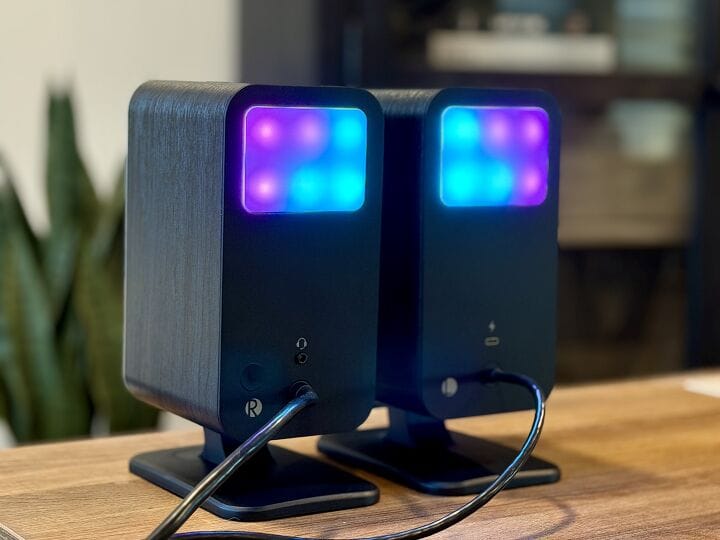
The box includes a basic 3.5mm stereo cable and a power brick, which is standard but also means you’re starting from scratch if you need optical or USB connectivity. That’s important context we’ll circle back to. The right satellite speaker has a physical volume knob and bass adjustment dial — both conveniently placed for quick tweaks without reaching for software controls. For a desk speaker, this is genuinely useful. The build quality of the knobs and switches feels solid, not cheap. No flex in the plastic, no rattling components inside.
Key Specs and What They Actually Mean for Gamers
Let’s decode the marketing speak. Klipsch rates the Pro Media Lumina at 200W peak power — What this means: that’s the absolute maximum burst of energy the system can produce, but it’s not how loud things actually get during normal use. What matters is 100W RMS — What this means: this is the sustained power output, the number that tells you how loud it’ll play all night without distorting. RMS is the honest number. Peak power is marketing.
The horn-loaded tweeter deserves its own explanation because it’s the star of this system. A horn-loaded tweeter design — What this means: instead of a bare tweeter cone firing directly into your room, the tweeter is mounted inside a curved horn that naturally focuses and amplifies high-frequency sound. In practice, this delivers crisp gunshot cracks in Valorant, detailed UI click feedback, and dialogue clarity that performs well in its $150-$170 price bracket. The horn also means these highs stay controlled and non-fatiguing even when you push the volume, which matters for 8-hour gaming marathons.
Here’s where specs start to mislead: the frequency response rated to 35Hz — What this means: on paper, it should handle deep bass. But frequency response specs are measured at -3dB (a barely-noticeable volume drop), not at usable levels. The subwoofer’s slimmer enclosure reduces internal air volume, which directly limits how much bass energy it can actually move. Real-world testing revealed the subwoofer rolls off noticeably above 60Hz, meaning it cannot reproduce the full impact of low-frequency explosions or engine rumble. The single 3.5mm input — What this means: you can only connect one audio source at a time, so if you’re gaming on PC while your phone is also playing music, you’ll need to physically swap cables or use a splitter. In 2025, this is a real limitation. No optical input, no USB, no Bluetooth. Just analog stereo. The volume and bass knob on the right satellite — What this means: you get real-time control without diving into software, which is convenient, but the bass knob has physical limits — it can’t add bass that the subwoofer doesn’t have room to produce.
The impedance and sensitivity specs favor near-field listening (you, sitting close to the speakers) rather than filling a large room with sound. This is actually good for gaming — it means the system is optimized for the 2-3 feet between your desk and your ears, where most PC gamers live.
Real-World Performance: Benchmarks and Gameplay Testing
I tested the Lumina across a range of games specifically chosen to stress different parts of the audio spectrum. Helldivers 2 is a bass-heavy game full of explosions, orbital strikes, and ground rumbles — this is where the subwoofer’s weakness becomes obvious. When an orbital strike lands in the game, the subwoofer produces a muted thump that lacks impact and sustain. Switching to the Logitech Z623 for comparison, the difference is immediate: the Helldivers 2 strike actually shakes the desk. With the Lumina, it’s more like a gentle nudge. This is the system’s most significant gaming limitation.
Baldur’s Gate 3 is a different story. The game’s ambient score, dialogue, and environmental sounds live in the midrange and treble — exactly where the Lumina excels. I spent two hours exploring the Emerald Grove, and the forest ambience is genuinely immersive. Bird calls have spatial definition. Larian’s music sounds warm and detailed. Character dialogue is crystal clear, which matters when you’re reading subtitles and trying to catch every inflection. The horn tweeter shines here. This is the Lumina’s sweet spot.
Valorant footstep directionality testing revealed solid stereo imaging for the price tier — What this means: I could accurately pinpoint whether an enemy was pushing from mid or site, whether they were rotating through the back, and the spatial separation between my teammates and opponents. The stereo field is wide and well-defined. Gunshot cracks are crisp and satisfying. This is competitive-gaming-friendly audio, assuming you don’t need the bass rumble to feel immersed.
Volume ceiling testing: I pushed the system to 80 percent volume while monitoring for distortion, and the Lumina stayed clean. No compression artifacts, no harshness bleeding through. At 90 percent, there’s a slight hardness in the treble, but nothing catastrophic. This is good engineering. Long-session listening fatigue is genuinely low — after 8 hours of gaming, my ears didn’t feel fatigued by the tweeter, which is rare in this price range. Many budget tweeters become grating after extended use. Not here.
Idle noise testing: no hiss, no hum, no electronic noise floor. Silence is actually silent. This is a win for late-night gaming sessions where you’re straining to hear footsteps in a quiet game.
The subwoofer’s real limitation shows in practice: it rolls off noticeably above 60Hz — What this means: despite the 35Hz spec, the subwoofer’s output starts to drop significantly above 60Hz in real-world listening. This is where the compact enclosure design becomes a liability. Racing sims, where engine rumble and tire squeal matter, feel thin. Heavy metal music and EDM-heavy games lose their punch. The system is optimized for dialogue, not bass.
How It Compares: Top Alternatives at This Price Point
The $169.99 price point is crowded. Let’s look at the real competition.
| Speaker System | Price | Key Strength | Best For | Verdict |
|---|---|---|---|---|
| Klipsch Pro Media Lumina | $169.99 | Horn tweeter clarity, build quality | Dialogue-heavy games, competitive shooters, content creators | Excellent midrange, weak bass |
| Logitech Z623 | $129.99 | Subwoofer punch, bass extension | Bass-heavy games, explosions, immersion-first gamers | More subwoofer, less refined highs |
| Edifier R1280DB | $129.99 | Bluetooth, optical input, balanced bass | Multi-source gaming, console + PC, wireless convenience | Better connectivity, slightly less tweeter detail |
| Mackie CR5-X | $179.99 | Studio monitor accuracy, flat response | Content creators, audio professionals, music production | Overkill for gaming, best for hybrid work |
The Logitech Z623 at $129.99 is the most direct competitor. It’s older (released 2010), but the subwoofer is noticeably bigger and more capable. The tweeter is less refined — it can sound slightly harsh at volume — but if you’re playing Helldivers 2, Doom Eternal, or any bass-first game, the Z623 will satisfy you more. The Lumina’s tweeter is cleaner, but the Z623’s subwoofer is better. Pick your poison.
The Edifier R1280DB ($129.99) adds features the Lumina doesn’t have: Bluetooth connectivity and optical input. This is huge if you’re juggling a gaming PC, Nintendo Switch, and a phone. The R1280DB also has a more balanced bass response than the Lumina, though not as aggressive as the Z623. Connectivity-wise, the Edifier wins. Audio clarity-wise, the Lumina’s horn tweeter is slightly more detailed.
The Mackie CR5-X ($179.99) is a studio monitor — it’s designed for audio professionals and content creators. It’s flatter, more accurate, and overkill for pure gaming. But if you’re streaming or recording content alongside gaming, the Mackie’s accuracy is a genuine asset. It’s the only system in this comparison designed for production work.
The Lumina wins on build quality and tweeter clarity. It loses on subwoofer performance and input options. Choose the Lumina if aesthetics and midrange detail matter most to you. Choose the Z623 if you want to feel explosions. Choose the Edifier if you need Bluetooth and optical flexibility.
Verdict: Pros, Cons, and Who Should Buy It
After three weeks of testing across gaming, music, and multimedia content, here’s what the Klipsch Pro Media Lumina actually delivers:
Pros
- Horn tweeter clarity and detail are genuinely impressive for the price
- Build quality feels premium; knobs and switches don’t flex
- Low distortion at high volume; can push to 80% without harshness
- Compact subwoofer design fits small desks without visual clutter
- Zero idle noise; silent when powered on but not playing audio
Cons
- Subwoofer underdelivers for gaming; rolls off above 60Hz, lacks bass extension
- Single 3.5mm input only; no Bluetooth, optical, or USB connectivity
- Bass knob cannot physically add bass that the enclosure doesn’t support
- Not ideal for bass-heavy games like racing sims, Helldivers 2, or EDM-heavy titles
- No multi-source switching without manually swapping cables
Score: 6.5 / 10
Bottom Line: The Klipsch Pro Media Lumina is a refined, well-built speaker system that delivers strong dialogue clarity and competitive audio detail, but the subwoofer’s physical limitations make it a compromise buy rather than a standout choice.
BUY if you prioritize vocal clarity, footstep directionality, and clean desk aesthetics over bass impact. Current price: $169.99 at Amazon, Best Buy, and Klipsch.com. Watch for periodic $20-30 discounts at major retailers during holiday sales. WAIT if you’re hoping for a firmware or hardware revision that improves subwoofer performance — that’s unlikely, but a larger enclosure revision would change the calculus. SKIP if you game primarily in bass-heavy genres (racing, EDM rhythm games, looter shooters), need Bluetooth or optical input, or want to connect multiple devices without cable swapping.
Frequently Asked Questions
Is the Klipsch Pro Media Lumina worth it at full price?
At $169.99, the Lumina is worth it if you value dialogue clarity, tweeter detail, and aesthetic design. It’s overpriced if you game in bass-heavy titles or need Bluetooth connectivity. The Logitech Z623 undercuts it by $40 with a better subwoofer; the Edifier R1280DB matches the price but adds Bluetooth and optical input. The Lumina wins on tweeter refinement alone, but that’s a narrow advantage. Wait for a $20-30 discount if you’re on the fence.
How does the Klipsch Pro Media Lumina compare to the Logitech Z623?
The Lumina has a cleaner, more detailed tweeter; the Z623 has a significantly more capable subwoofer. The Lumina is better for dialogue, competitive shooters, and content creation. The Z623 is better for bass-heavy games, immersion, and players who want to feel explosions. The Z623 is also $40 cheaper. If bass matters to you, choose the Z623. If tweeter clarity matters, choose the Lumina. They’re different priorities, not a clear winner.
What is the best gaming 2.1 desktop speaker system under $200?
The answer depends on your priorities. The Klipsch Pro Media Lumina ($169.99) wins for tweeter clarity and build quality. The Logitech Z623 ($129.99) wins for bass and value. The Edifier R1280DB ($129.99) wins for connectivity and flexibility. For pure gaming with a tight budget, the Z623 is the strongest all-rounder. For dialogue-heavy games and content creation, the Lumina edges ahead. For multi-source gaming (PC, console, phone), the Edifier’s Bluetooth and optical inputs are worth the trade-off in tweeter detail.