Melon Sandbox Android Review: Is It Worth Downloading?
Disclosure: As an Amazon Associate, Bytee earns from qualifying purchases.
You spawn a pixelated melon character, strap a rocket booster to its back, and watch it smash into a wall of TNT—all within five seconds of launching the app on your phone. Welcome to Melon Sandbox, the physics playground that’s basically digital chaos in your pocket. If you’ve ever wondered what happens when you give creative players unlimited ragdoll bodies, destructible environments, and a physics engine that doesn’t care about realism, this is your answer.
What Kind of Game Is It? — First Impressions
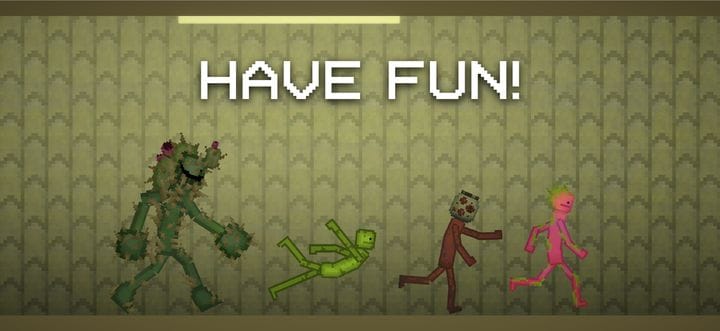
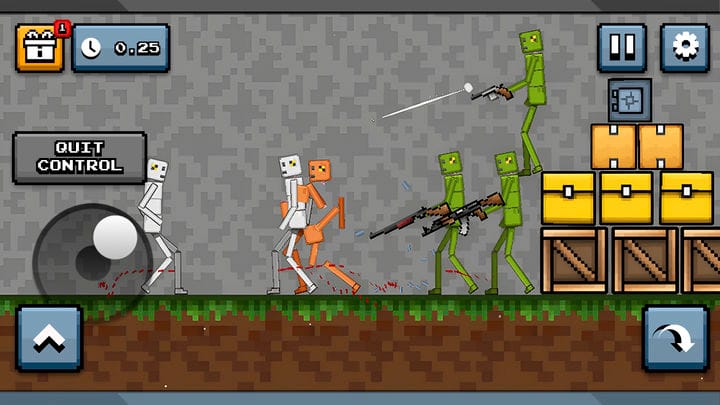
Melon Sandbox is a physics sandbox game—think of it as a digital playground where the only rule is “what happens if I do this?” You’re not following a story or grinding through levels. Instead, you’re spawning characters (mostly melons, but also other weird shapes), throwing them around, attaching objects to them, and watching the physics engine do its thing. The pixel art style is charming and simple, which actually works in the game’s favor because it keeps things light and goofy rather than trying to be realistic.
The controls are dead simple—tap to select, drag to move, tap buttons to spawn items or activate physics effects. If you’ve played any mobile game before, you’ll understand how this works instantly. There’s no tutorial, but honestly, you don’t need one. The game throws you into the sandbox with a bunch of tools visible on the screen, and your brain immediately goes “okay, let’s break stuff.” That’s the whole appeal. It’s the gaming equivalent of playing with action figures, except the action figures are sentient melons and you can set them on fire.
Compared to People Playground (the OG chaos sandbox on PC), Melon Sandbox strips away the grotesque limb-detachment mechanics and focuses on pure, silly object-based destruction. You’re not engineering human suffering here—you’re watching melons ragdoll into explosives and bounce off springs. It’s more forgiving, more colorful, and way less likely to traumatize your younger siblings if they catch you playing.
Gameplay Deep Dive: What You Actually Do All Day
Here’s what a typical Melon Sandbox session looks like: you spawn a melon, maybe add some legs or wheels to it, throw a rocket on its back, and launch it across the screen. Then you spawn ten more melons and create a chain reaction disaster. Or you build a weird contraption using the physics tools—springs, magnets, explosives—and see what breaks first. There’s no win condition, no lose condition, just pure experimentation. The real moment when the game clicks is when you realize you can combine tools in unexpected ways—like using a magnet to hold a TNT block in place while a spring-loaded melon launches toward it, creating a timed explosion. That’s when you stop randomly clicking and start actually engineering chaos.
The game’s got a solid collection of tools right out of the box: TNT, fire, water, ice, magnets, joints, and more. Each one behaves differently and creates different chaos. Want to make a melon freeze and shatter? Ice it. Want to watch it ragdoll across the map? Gravity bomb. Want to attach it to another melon with a spring and watch them bounce around? That’s an option too. The physics aren’t always perfect—sometimes things clip through walls or behave weirdly—but that’s part of the charm. It adds to the chaos rather than detracting from it. On mid-range Android devices, you can reliably spawn 15-20 melons before frame rate noticeably dips, which is plenty for most scenarios.
What really sets Melon Sandbox apart is the user-generated content angle. The game includes modding tools that let you create your own scenarios, characters, and physics experiments. You can share these creations with the community, and download other players’ creations. This means the game’s content library is constantly growing. One week you’re messing with basic melon chaos; the next week you’re downloading someone’s elaborate Rube Goldberg machine or a recreation of some wild physics scenario. It’s the kind of game that gives you 30 minutes of entertainment per session, but you’ll keep coming back because there’s always something new to try.
Monetization: Free-to-Play or Pay-to-Win?
Melon Sandbox is completely free to download and play. There’s no paywall blocking you from the core sandbox experience. The game makes money through ads—you’ll see them occasionally, especially when you’re navigating menus or finishing a session. They’re not aggressive or intrusive, and you can play for long stretches without hitting them. It’s the kind of ad model that feels fair because the game is genuinely free, not a “free demo that costs $50 to unlock.”
There’s an optional premium subscription that removes ads and unlocks some cosmetic extras (melon skins, UI themes), but—and this is important—it doesn’t give you access to more physics tools or gameplay features. Everything that matters is available to free players. Your melon will ragdoll just as hard whether you paid or not. The UGC content (user-created stuff) is also mostly free, so you’re not locked out of community creations because you didn’t drop cash. There’s no stamina system, no energy gates, and no “come back in 4 hours” mechanics—you can play continuously as long as you want.
Model: Free with optional cosmetic-only premium subscription
Pay-to-Win Level: Zero—no gameplay advantages behind a paywall
Free Player Experience: You get the full sandbox experience with zero gameplay restrictions. Ads appear occasionally but aren’t intrusive. All physics tools, modding features, and community content are accessible without paying.
Comparison: If you liked People Playground, this is similar but focuses on object physics rather than character anatomy, making it more lighthearted and mobile-friendly without sacrificing depth in the modding tools.
Android Performance and Technical Quality
Melon Sandbox runs surprisingly well on mid-range Android devices. We’re talking Snapdragon 600-series chips, 4GB RAM, that kind of thing. The pixel art style means it’s not demanding a ton of processing power, and the physics engine, while doing a lot of calculations, is optimized well enough that you won’t get constant frame drops. On a newer phone, it runs buttery smooth. On an older device, you might see some stuttering when there are 25+ objects on screen simultaneously, but nothing that breaks the game.
Battery drain is reasonable for a game that’s running physics simulations constantly. You won’t kill your battery in 30 minutes, but you’ll definitely notice the drain if you play for 2+ hours straight. That’s normal for this type of game. The game also supports offline play fully—you don’t need an internet connection to spawn melons and make them explode. You only need internet if you want to download community content, which is a smart design choice that lets you play anywhere without data throttling concerns.
One thing to note: occasional physics glitches happen. Objects sometimes clip through walls, ragdolls occasionally get stuck in geometry, and the physics calculations can produce weird results if you stack too many spring-loaded objects. But honestly? In a sandbox game, these feel like features, not bugs. Half the fun is discovering some weird physics quirk and exploiting it for chaos. The app size is around 150-200MB depending on your device, so it won’t eat up your entire storage. Storage footprint is lean compared to modern mobile games.
Should You Download It? Final Verdict
Melon Sandbox is absolutely worth downloading if you like creative, open-ended games where the fun comes from experimentation rather than progression. It’s perfect for those 10-15 minute breaks during your day, but it’s also the kind of game you can sink hours into if you’re in the right headspace. The monetization is fair, the performance is solid, and the community-created content keeps things fresh. There’s no progression system or unlock trees—just pure sandbox freedom from the first tap.
8 / 10
Yes, download it. Best For: Creative players, chaos enthusiasts, and anyone who wants a guilt-free physics sandbox that doesn’t demand your money. It’s free, it’s fun, and it’s absolutely worth the storage space. You’ll either delete it after 5 minutes or you’ll be launching melons into TNT walls at 2 AM. There’s no middle ground.
Genre: Physics Sandbox
Developer: Melon Sandbox Team
Price: Free (optional premium subscription)
Size: ~150-200 MB
Rating: 4.3 / 5 ⭐ (Google Play)
Frequently Asked Questions
Is Melon Sandbox free to play on Android?
Yes, completely free. You can download it and play the entire sandbox with zero paywalls. There’s an optional premium subscription to remove ads and unlock cosmetic skins, but it’s not required for any gameplay features.
Does Melon Sandbox work offline on Android?
Absolutely. The full sandbox experience works offline—spawning objects, physics simulations, everything. You only need internet if you want to download user-created content from the community library.
What’s the difference between Melon Sandbox and People Playground?
Melon Sandbox is the mobile version with simplified controls and a focus on object-based physics chaos. People Playground is PC-focused and includes character anatomy mechanics that Melon Sandbox skips entirely. Melon Sandbox is more lighthearted and mobile-optimized, while People Playground goes darker and more complex.
Can I create and share my own content in Melon Sandbox?
Yes. The game includes full modding tools that let you build custom scenarios and share them with the community. You can also download and play creations from other players, which keeps the content fresh long-term.
What’s the minimum Android device needed to run Melon Sandbox?
Melon Sandbox runs on mid-range Android devices with Snapdragon 600-series processors and 4GB RAM without major issues. Newer devices run it smoothly. Older hardware may experience stuttering with 25+ objects on screen, but the game remains playable.