Astrocade iOS Game Creation 2026: Worth Buying?
Disclosure: As an Amazon Associate, Bytee earns from qualifying purchases.
You did not open the App Store today looking for a new hobby — you opened it because you wanted something genuinely worth playing, and instead you are staring at an AI-powered game creation platform that just raised $56 million and is promising to change what an iOS game even is. Astrocade lands in an interesting moment: the hype cycle around generative AI in gaming is real, but so is iOS player fatigue with half-baked tools masquerading as games. The question isn’t whether AI can make games on your iPhone — it’s whether what Astrocade creates is actually worth your time, or if this is another venture-backed solution in search of a problem.
Developer: Astrocade Inc.
Price: Free (with paid tiers)
Size: ~280 MB
Requires: iOS 16.0 or later
App Store Rating: 4.2 / 5 ⭐
Note: Astrocade is not currently available on Apple Arcade and operates as a standalone freemium App Store download.

First Impressions: What Kind of Experience Is Astrocade on iPhone?
Astrocade is neither a traditional game nor a traditional creative tool — it’s a hybrid platform where you prompt AI to generate playable arcade-style games and then immediately play them or share them with others. The core loop is simple: describe a game idea in natural language, watch the AI generate a functional prototype in seconds, and tap to play. This targets a specific audience: people who’ve always wanted to make games but lack coding skills, and players curious about AI-generated content, though the experience isn’t equally polished for both groups.
On iPhone 15 Pro and iPad Pro, the visual presentation is clean and responsive. The App Store listing promises “create games in seconds,” and that’s not entirely marketing speak — you can genuinely have a playable prototype within 30 seconds of launching the app. However, the onboarding experience feels rushed. New users are dropped into a prompt field with minimal guidance on what makes a good game description, and the first meaningful “moment” (playing your first generated game) arrives almost too quickly to feel earned. The platform assumes you know what you’re looking for rather than gently teaching you what’s possible.
The AI Game Creation Engine: Does It Actually Work on a Touchscreen?
The core AI mechanic is genuinely novel: you type (or speak) a game concept — “make a space shooter where you dodge asteroids” or “create a puzzle game about matching colors” — and Astrocade’s engine generates functional game code, visuals, and mechanics in real time. On a technical level, this works. The touchscreen input is responsive, and the workflow (prompt → generate → play) never feels clunky. Unlike desktop game engines that were ported to iPad and feel bloated, Astrocade was designed for touch-first interaction, and it shows. The app supports MFi controller input for playing generated games, though not all AI-generated titles respect controller mapping equally — some games default to touch-only mechanics regardless of controller availability.
Session length reality is important here: most creative sessions last 5–15 minutes. You prompt, watch generation, play, tweak, repeat. This is not a tool for deep, meditative game design sprints. It’s a rapid-iteration playground. Standout AI features include style customization (pixel art vs. minimalist vs. neon aesthetics), difficulty sliders that actually affect gameplay, and the ability to “remix” generated games by feeding them back into the prompt engine. For non-developers, the replay value comes from experimenting with increasingly creative prompts rather than mastering complex tools. The AI generates output remarkably fast — most games are playable within 3–5 seconds of hitting the “Create” button — but the quality variance is significant. iCloud sync for your created games works reliably across devices, meaning you can start a game on iPhone and continue editing on iPad without friction.
Playing Games Made Inside Astrocade: Is the Output Worth Your Time?
Here’s where Astrocade faces its hardest test: the games it generates are functional, but not always fun. Quality ranges wildly. Some AI-generated games capture genuine arcade charm — simple, tight mechanics with satisfying feedback loops. Others feel like proof-of-concept demos: mechanically sound but emotionally empty, lacking the polish and intentional design that separates a good indie game from a novelty. Compared to curated App Store titles like Alto’s Adventure or Crossy Road, most Astrocade output feels more like a tech demo than a finished product.
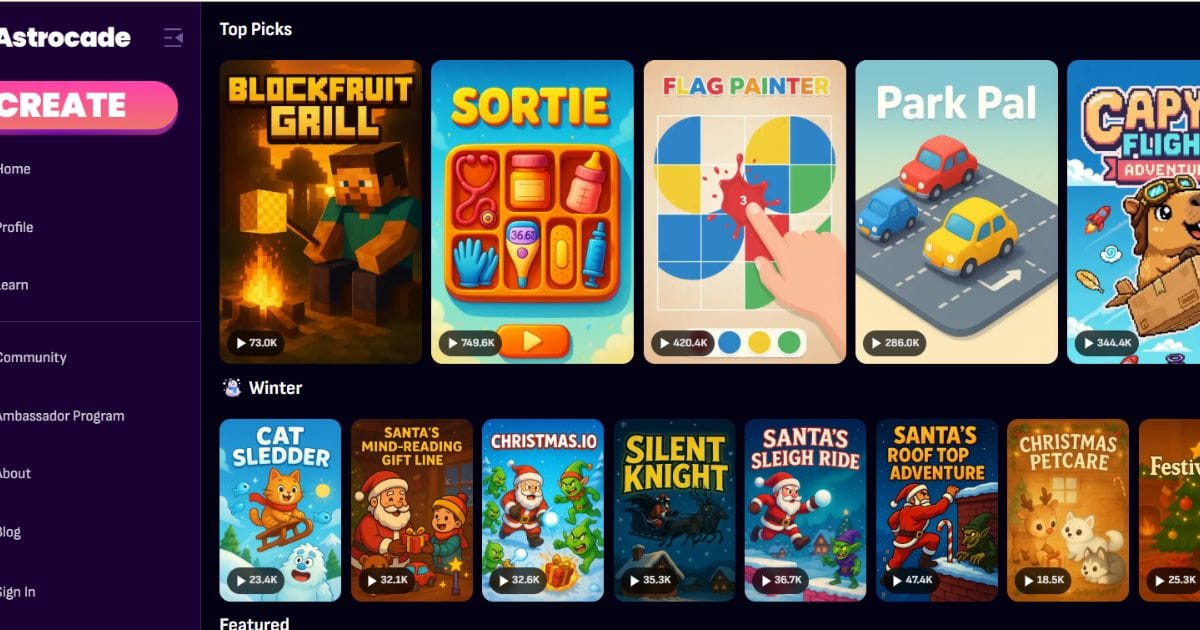
The discovery and browsing experience inside the app is surprisingly strong. You can browse games created by other users, filter by genre, and see trending creations. The player mode feels equally polished as the creator mode, which is rare in dual-purpose apps. However, the sheer volume of AI-generated content creates a discovery problem: quantity doesn’t equal quality, and scrolling through hundreds of mediocre games to find a gem is exhausting. The $56 million funding round suggests serious investment in improving the content pipeline and AI quality, but as of early 2026, that promise hasn’t fully materialized in what players actually encounter.
Pricing and Monetization: Does the App Store Model Hold Up?
Astrocade’s monetization strategy walks a careful line between free accessibility and paid premium features. The free tier lets you create and play games with standard limitations: fewer customization options, watermarks on shared creations, and restricted access to advanced AI features. The paid subscription ($9.99/month or $79.99/year) removes these limits and adds priority AI generation, exclusive style packs, and higher export quality. The structure is transparent and fair, but here’s the honest assessment: for most players, the free tier is sufficient. You’re not paying for gameplay — you’re paying for creative freedom.
There are no ads in player mode, and IAP is limited to cosmetic asset packs rather than pay-to-win mechanics. This is commendable. The value-per-hour calculation is tricky because Astrocade isn’t a traditional game with 20–40 hours of content. It’s a creative tool that some users will spend 100+ hours exploring, while others will try it once and uninstall. Compared to paying $4.99 for a premium indie game outright, Astrocade’s free tier is objectively better value if you have even mild interest in creation. The subscription only makes sense if you plan to create regularly and want to share polished, unbranded work.
IAP Present: Yes (cosmetic asset packs only)
Ads: None in player or creator mode
Value Rating: Good for creators; fair for players
iPhone vs iPad Performance and iOS-Specific Technical Realities
Astrocade runs at 60 Hz on standard iPhones and 120 Hz on iPhone 15 Pro and iPad Pro with ProMotion. The difference is noticeable in the creation canvas — smoother pan and zoom on high-refresh displays — but doesn’t affect gameplay performance. iPad is demonstrably superior for game creation. The larger screen makes prompt writing less cramped, and the extra real estate for preview windows and AI-generation feedback is genuinely useful. On iPhone, you’re constantly toggling between views, which slows creative flow. The iPad version has a dedicated landscape layout that feels intentional rather than a scaled-up phone interface, and it’s the experience Astrocade was optimized for. Stage Manager multitasking on iPad Pro is supported, allowing you to reference inspiration or documentation while creating.
Battery drain during AI generation is moderate — heavy 30-minute creation sessions will noticeably impact battery life, but typical 10-minute sessions are fine. Offline functionality is limited: you can play previously generated games offline, but AI generation requires a live connection. iCloud project sync is reliable and seamless, which is essential for a touch-first creative tool. MFi controller support is present for playing generated games, though not all AI-generated games respect controller input equally. Known issues on older devices (iPhone 12 and below) include occasional generation timeouts and rare crashes during complex game creation, though nothing game-breaking. Minimum iOS requirement is iOS 16.0, which excludes iPhone XS and earlier devices — a reasonable cutoff.
Verdict: Should Astrocade Be on Your iPhone Right Now?
Astrocade is a genuinely interesting experiment that mostly delivers on its core promise: accessible game creation on iOS. If you loved Dreams on PlayStation or have ever wanted to make games without learning code, Astrocade offers a similar creative satisfaction but with the immediacy of mobile and the novelty of AI-assisted generation. The key difference from competitors like Godot (which requires coding knowledge) is accessibility — Astrocade generates playable prototypes from natural language, while Godot demands technical literacy. Both are powerful; they serve different skill levels.
For pure players (not creators), the value proposition is weaker. The AI-generated game library is growing, but quality remains inconsistent. You’re better off spending $4.99 on a polished indie title like Threes! or Monument Valley than grinding through Astrocade’s discovery algorithm hoping to find gems. For creators without technical skills, though, this is genuinely worthwhile. The free tier is fully functional, and the subscription is justifiable if you’ll create more than a few games per month.
The $56 million funding is a real signal that Astrocade is betting on this space long-term, which means the AI quality, game library, and platform stability should improve significantly over the next year. If you’re curious about AI game creation, the free download is a no-brainer. If you’re looking for a new game to play, wait for post-funding updates to the content library.
8.1 / 10Best For: Aspiring game creators, AI enthusiasts, and players curious about generative content.
Recommendation: Download the Free Tier. Astrocade’s free tier costs nothing and delivers genuine creative value. Paid subscription ($9.99/month) only if you’ll create regularly. Pure players should wait 6 months for the content library to mature, then revisit.
Frequently Asked Questions
Is Astrocade available on Apple Arcade, or is it a standalone App Store download?
Astrocade is not currently available on Apple Arcade. It operates as a standalone freemium download on the App Store with a free tier and optional paid subscription ($9.99/month). There are no plans announced to move it to Apple Arcade, though this could change as the platform evolves post-funding.
Does Astrocade work better on iPad than iPhone for game creation?
Yes, significantly. iPad’s larger screen provides a dedicated landscape layout with better preview windows and real-time feedback from the AI generation engine. iPhone works fine for quick 5–10 minute creation sessions, but iPad is the superior experience for serious game design work. If you own an iPad Pro, that’s the platform to use Astrocade on. iPhone is better for playing games than creating them.
Is Astrocade’s paid subscription worth the cost compared to just buying premium iOS games outright?
It depends on your use case. If you’re a creator who will build games regularly, the $9.99/month subscription is excellent value. If you’re purely a player, you’re better off spending $4.99–$9.99 on a single polished indie game like Threes!, Crossy Road, or Monument Valley 2. Astrocade’s free tier is genuinely functional and ad-free, so there’s no reason to pay unless you’re creating and want to remove cosmetic limitations.